

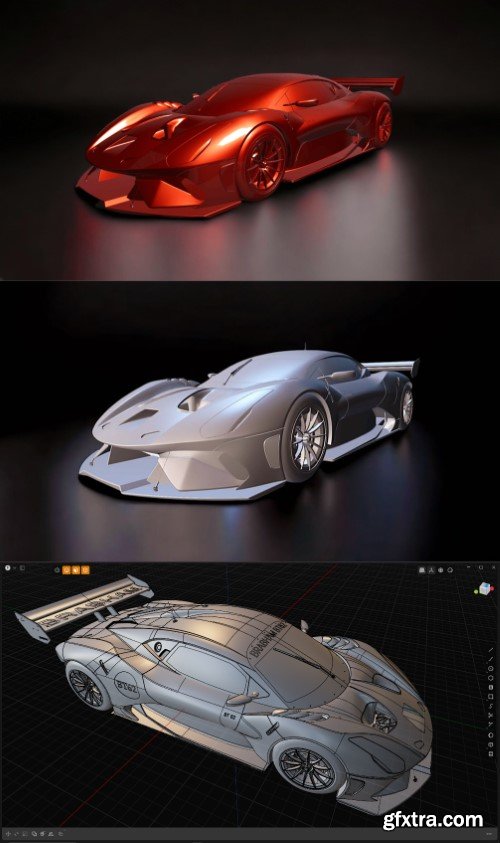
- Watch this video first (Guide to the references and blueprints), it will get you started with Plasticity scene. In this series, you'll spot some quirky moments, like me starting from the car door instead of the wheel, which is what everyone else does. But hey, that's just one of the secrets behind the perfection!
The course is 100% narrated in English, also I've just added subtiles in 5 languages: -English -Spanish -French -Italian -Chinese Version: Plasticity 3D 1.4 + Any version will work just fine! Target Audience: Intermediate Introducing Highly Detailed Car Modeling for Plasticity 3D: Brabham BT 62 Course Includes: - 24 hours of fully narrated, high-quality 3840 x 2160 content (These videos take a long time to download, unless you got fiber) - 24 hours of fully narrated, high-quality 1920 x 1080 content (perfect for slower machines, and normal internet connection) - Blueprints to kickstart your journey (The blueprints featured in the promo video are protected by copyright, so I can't share those with you. However, I've got some alternative blueprints that you can use, as good as mine) -The first 14 videos feature a realistic AI voice, and from about the halfway point of the 14th video, you'll hear my own voice take over. - Reference images for inspiration - Plasticity scene files (with all the needed blueprints and many other images which will come really in handy to you) 3D model is i ncluded as Plasticity file. - Blender scene files (for showcasing your work, including the 3D BrabHam bt 62 as OBJ file) - Well-organized folders for easy navigation Plus, you’ll receive: - 2 JSON files to install my radial menu on your machine, complete with a video tutorial - Useful links to enhance your learning experience Why This Course? - Professional Modeling Methods: Dive into 49 different videos that break down each approach in a simple, fast-paced manner. This course serves as the perfect guide that you can revisit anytime to refresh your memory on essential techniques. - Best Spline and Patches Workflow: Master the art of creating clean CAD surfaces. Requirements to Get Started: - A basic understanding of Plasticity 3D 1.4 (that’s it!) This course also covers the texturing process in Blender (no UVs required).

PolyPaul__x27_s_Plasticity_Car_Course.part2.rar - 3.0 GB
PolyPaul__x27_s_Plasticity_Car_Course.part3.rar - 3.0 GB
PolyPaul__x27_s_Plasticity_Car_Course.part4.rar - 3.0 GB
PolyPaul__x27_s_Plasticity_Car_Course.part5.rar - 3.0 GB
PolyPaul__x27_s_Plasticity_Car_Course.part6.rar - 3.0 GB
PolyPaul__x27_s_Plasticity_Car_Course.part7.rar - 2.8 GB


126,000 Royalty-Free 3D Model

Udemy Türkçe


Top Rated News
- CreativeLive Tutorial Collections
- Fasttracktutorials Course
- Chaos Cosmos Library
- MRMockup - Mockup Bundle
- Finding North Photography
- Sean Archer
- John Gress Photography
- Motion Science
- AwTeaches
- Learn Squared
- PhotoWhoa
- Houdini-Course
- Photigy
- August Dering Photography
- StudioGuti
- Creatoom
- Creature Art Teacher
- Creator Foundry
- Patreon Collections
- Udemy - Turkce
- BigFilms
- Jerry Ghionis
- ACIDBITE
- BigMediumSmall
- Globe Plants
- Unleashed Education
- The School of Photography
- Visual Education
- LeartesStudios - Cosmos
- Fxphd
- All Veer Fancy Collection!
- All OJO Images
- All ZZVe Vectors
- CGTrader 1 CGTrader 2



















