

https://www.skillshare.com/en/classes/creating-a-bicycle-helmet-in-plasticity/1138085644
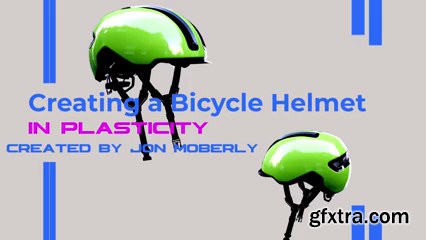
This is a step-by-step class in creating a 3d Bicycle Helmet in Plasticity. This class will cover essential tools and functions in creating this Bicycle Helmet. It will cover 3D CAD modeling techniques. The 7 hours class is for 3D artists, designers and concept artists who want to further strengthen their foundation in using Plasticity. This class is setup for Beginners to Intermediate Levels. This class is supporting Indie learners and does not include X-Nurbs in this process build out.
Hands-on Class Project I have picked the ABUS bicycle helmet model that is available for purchase on the ABUS website. I felt this model is a great production model to learn from in creating certain shapes and forms. So, I will first show how to prepare for the modeling by getting the necessary images. Then I will show how to bring in images to support the build out of this model. Then I will go straight into making the main helmet forms by using G1 and G2 lines by using loft and Patching. The main helmet form is one of the more complex parts of the video, but we need this form first so that we can add other parts to the main form. From there we will be cutting out parts of the helmet and re-modeling these sections back in to add in interest to the main shapes. Once the main helmet form is set then we will tackle adding in an inner foam part to the inside of the helmet. Once the inner is completed then we will tackle adding in a new brake light system to the back of the helmet. Next, we will tackle creating a new lid for the front of the helmet. Next, we will create the strap holding part and then the straps. Lastly, we will then export out this into a OBJ file format to be able to be sent to other 3d platforms for texturing and rendering. The class requirement is to go through each video and then to upload your wonderful model images of the work you have completed throughout the course. Each student will submit their images of the objects they made which are the ones that are discussed in the gallery requirements video. Please submit an image or rendering of the forms to the class project gallery to show your work and great progress in this course. Looking forward to seeing these! 


126,000 Royalty-Free 3D Model

Udemy Türkçe


Top Rated News
- CreativeLive Tutorial Collections
- Fasttracktutorials Course
- Chaos Cosmos Library
- MRMockup - Mockup Bundle
- Finding North Photography
- Sean Archer
- John Gress Photography
- Motion Science
- AwTeaches
- Learn Squared
- PhotoWhoa
- Houdini-Course
- Photigy
- August Dering Photography
- StudioGuti
- Creatoom
- Creature Art Teacher
- Creator Foundry
- Patreon Collections
- Udemy - Turkce
- BigFilms
- Jerry Ghionis
- ACIDBITE
- BigMediumSmall
- Globe Plants
- Unleashed Education
- The School of Photography
- Visual Education
- LeartesStudios - Cosmos
- Fxphd
- All Veer Fancy Collection!
- All OJO Images
- All ZZVe Vectors
- CGTrader 1 CGTrader 2



















