

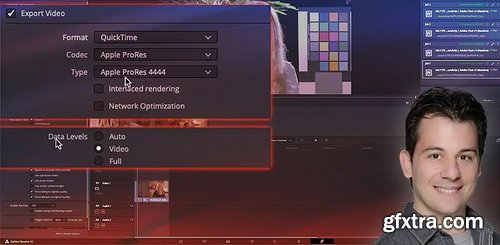
Wrestling with round-trip workflows Roundtripping between post production software applications is complex and ever-evolving, especially as all of our software platforms get updated independently of each (and generally with little regard for competing platforms). It’s nearly impossible to generate a broad set of rules for moving timelines between different applications that work 100% of the time. That’s exactly why I have to emphasize that everything in this insight is evolving and the recommendations found are based on the specific versions of the software utilized in the test, at this moment in time. Throughout this series, I’ll be approaching application-specific issues and will attempt to boil them down to a simplified set of recommendations that you can follow for optimal results. If at some point in the future you follow these recommendations and the workflow breaks down, let me know in the comments! I will revisit this topic in the future on an as-needed basis. Today, we’re deconstructing the often problematic rendering from DaVinci Resolve into Premiere Pro. For years, colorists and editors have been complaining about shifts in contrast when importing Resolve renders into Premiere. And for years, the advice has been changing. Guess what? My advice is changing again! A word of caution This insight is filled with assumptions based on my current run of these workflow tests. In fact, while recording this Insight I had to completely revise my workflow advice, since recent updates to both DaVinci Resolve and Premiere Pro made that advice 100% wrong and I found a new problem! The advantage of being in a community like Mixing Light is that we can alert each other to these changes and then update our shared documentation. Consider this Insight an update to our shared documentation! Key takeaways from this Insight By the end of this Insight, you should understand how: On MacOS, the ‘data vs. video levels’ issue between Premiere Pro and DaVinci Resolve is fixed if you select Auto for your DaVinci Resolve exports using 444 codecs. Important note: While this should be consistent with the Windows version, there could be slight differences between operating systems. If you find any differences, please share them in the comments section. There’s a new issue with 422 exports, which exhibit visible color shifts! My recommendation is: Only export 4444 media when rendering to Premiere Pro. This Insight currently applies to software versions: Premiere Pro v23.10 or later DaVinci Resolve 18.1.2 or later



126,000 Royalty-Free 3D Model

Udemy Türkçe


Top Rated News
- CreativeLive Tutorial Collections
- Fasttracktutorials Course
- Chaos Cosmos Library
- MRMockup - Mockup Bundle
- Finding North Photography
- Sean Archer
- John Gress Photography
- Motion Science
- AwTeaches
- Learn Squared
- PhotoWhoa
- Houdini-Course
- Photigy
- August Dering Photography
- StudioGuti
- Creatoom
- Creature Art Teacher
- Creator Foundry
- Patreon Collections
- Udemy - Turkce
- BigFilms
- Jerry Ghionis
- ACIDBITE
- BigMediumSmall
- Globe Plants
- Unleashed Education
- The School of Photography
- Visual Education
- LeartesStudios - Cosmos
- Fxphd
- All Veer Fancy Collection!
- All OJO Images
- All ZZVe Vectors
- CGTrader 1 CGTrader 2



















