

- PREREQUISITES: Knowledge of ZBrush and digital sculpting strongly recommended; basic knowledge of Maya and ZBrush is required; basic knowledge of Photoshop strongly recommended; course pre-reqs include Anatomy for Production
- MATERIALS: Zbrush, Maya (3DS Max or Blender ok), & Photoshop (or equivalent software)
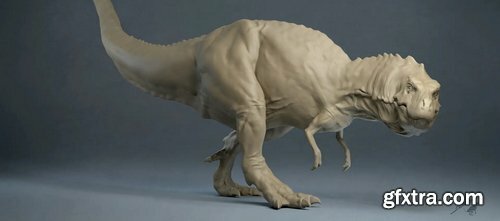
- In this course, students will create their own animal anatomy study in ZBrush. They will learn how to construct a model from the inside out, starting by building the skeletal system and adding muscles and skin later on. This course will also focus on portfolio by covering how to light and render a beautiful study in Maya and Photoshop. In the second part of the course, students will jump from the study to the creation process by learning how to build up their own creatures. They will create the anatomy of their own dragon and discover the workflows to sculpt details and paint accurate skin colors in ZBrush.
Week #1: Introduction to Animal Anatomy: Understanding the Principle of Motion Hierarchy of animal anatomy | Motion: skeleton, muscles, articulation, direction | Basic understanding of design: carnivore vs. herbivore | From design to study | Anatomy study and paint-over in Photoshop Week #2: Anatomy of the Skull: Understanding the Notion Behind Bones Introduction to animal face anatomy | Description of the face | Skull sculpting Week #3: The Center of Everything: Understanding the Spinal Column and Rib Cage Basic understanding of the body structure and connection | Deeper understanding of the anatomy of the spine | From the scapula to the fingers | Standing on the legs | Creating the base of our animal in ZBrush Week #4: Week 4| Pull to Motion: Understanding the Function of a Muscle Understanding the role of a muscle | Description of the head anatomy | The spinal column muscles | ZBrush sculpting Week #5: From the Écorché to the Living Creature: the Fat and the Skin Fat presence on the body | The skin’s appearance | The écorché in ZBrush | Understanding the anatomy of fur Week #6: Between Study and Art: the Motion in Action Put motion into practice | The photographic look of an animal anatomy study | The clay material | Create a pose in ZBrush | Setting up our studio in 3D Week #7: From Study to Creation: How to Translate Anatomy From one Species to Another Interpreting anatomy | Introduction to the dragon project | Creating the base in ZBrush Week #8: More Limbs: What Does it Take to Be a Dragon? Dragon skeleton draw-over | Study from Avatar’s creatures | Building our dragon’s écorché in ZBrush | Adding the wings Week #9: The Beauty Behind the Details: How to Create High-Detailed Sculpts Creating details in ZBrush | Using Photoshop to create details | Posing our dragons Week #10: From Study to Production: Putting a Model Into a Production Environment Understanding production needs | Colorize your creature | From 3D to illustration The more you know, the better.



NeoSkola Bütün Kursları

Udemy Türkçe


Top Rated News
- TheBoudoirDivas All Tutorial
- 126,000 Royalty-Free 3D Models
- CreativeLive Tutorial Collections
- Fasttracktutorials Course
- Chaos Cosmos Library
- MRMockup - Mockup Bundle
- Finding North Photography
- Sean Archer
- John Gress Photography
- Motion Science
- AwTeaches
- Learn Squared
- PhotoWhoa
- Houdini-Course
- Photigy
- August Dering Photography
- StudioGuti
- Creatoom
- Creature Art Teacher
- Creator Foundry
- Patreon Collections
- Udemy - Turkce
- BigFilms
- Jerry Ghionis
- ACIDBITE
- BigMediumSmall
- Globe Plants
- Unleashed Education
- The School of Photography
- Visual Education
- LeartesStudios - Cosmos
- Fxphd
- All Veer Fancy Collection!
- All OJO Images
- All ZZVe Vectors
- CGTrader 1 CGTrader 2



















