

Prep: Get Your Business Blooming Items Used: Key Things to Take Away: Shoot – Field of Flowers Items Used: Key Things to Take Away: Retouching #1: Tracing with a Tablet Items Used: Retouching #2: Quick and Effective Composition Retouching #3: Layering While Lying in Flowers Retouching #4: Retouch Aging – Naturally Retouching #5: Hot Pink Mood with Alienskin
Sue takes us through her journey of experimenting with various faux flowers and shares her conclusions from her newest experiment creating flowers out of pink tissue paper. Although fake flowers can be a cost newer photographers are hesitant to pay, Sue teaches you how you can easily cut corners and teases how she will use composites to create amazing floral designs to fill the entire shot and make it look like elegant fine art.
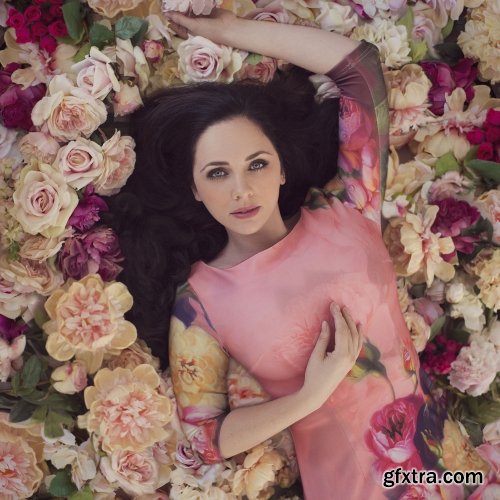
From Pinterest inspiration to reality, Sue takes us through her specifically designed photoshoot for Tiffany, a client who loves pink and wishes to have a beautiful floral themed print of herself hanging in her daughter’s bedroom. Sue shows us how to properly pose clients when they are laying down, how to successfully shoot both downwards and close up, how to create small bunches of flowers to easily create composites for the editing process, and how experimenting with unusual items in place of standard studio equipment can yield incredible results.
Sue shows us how she sets up her shots to be prepared for easy and natural looking compositing by tracing with her Wacom Intuis 5 tablet.
Though layers and composites can be time consuming, Sue teaches us how just one multi-layered creative photo shoot will be an immeasurable marketing tool for your business’s future, “Often times people will be drawn to your creative work, but won’t necessarily request it.” Watch how she draws people in by turning small bunches of flowers into what looks like an entire field.
Learn how to dodge, burn, and blur to make the details of the composite believable. Then Sue walks you through her process of layering to fill in the gaps of the image.
Sue walks us through how she quickly retouches clients with light aging into a natural edit, starting by lightening with the cloning tool, reducing neck lines when the client is lying down, to softening forehead lines, and finally using the dodge and burn tool effectively. “No one needs forehead wrinkles. No one.”
“To get a mood in Alien Skin, I just work my way around my favorites. ‘Fading’ and ‘Polaroid’ are my go-to.” See Sue’s process in playing around in Alien Skin, while taking in her client’s wish of a hot pink image but choosing a filter that also compliments her skin tones.


NeoSkola Bütün Kursları

Udemy Türkçe


Top Rated News
- TheBoudoirDivas All Tutorial
- 126,000 Royalty-Free 3D Models
- CreativeLive Tutorial Collections
- Fasttracktutorials Course
- Chaos Cosmos Library
- MRMockup - Mockup Bundle
- Finding North Photography
- Sean Archer
- John Gress Photography
- Motion Science
- AwTeaches
- Learn Squared
- PhotoWhoa
- Houdini-Course
- Photigy
- August Dering Photography
- StudioGuti
- Creatoom
- Creature Art Teacher
- Creator Foundry
- Patreon Collections
- Udemy - Turkce
- BigFilms
- Jerry Ghionis
- ACIDBITE
- BigMediumSmall
- Globe Plants
- Unleashed Education
- The School of Photography
- Visual Education
- LeartesStudios - Cosmos
- Fxphd
- All Veer Fancy Collection!
- All OJO Images
- All ZZVe Vectors
- CGTrader 1 CGTrader 2



















