

https://fredrikstromme.selz.com/item/5c394607f9ba2c0888a81378
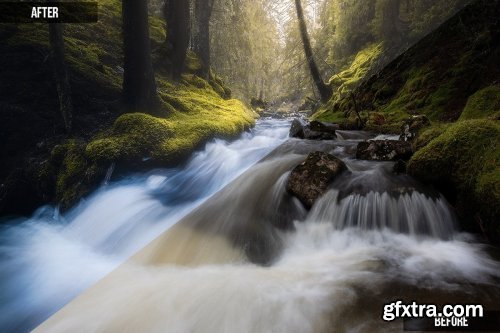
In this 1,5 hour long post-processing tutorial we will create a fairytale mood in a lush forest.We will be working in both Lightroom and Photoshop.
You will learn a simple way to figure out which colors to use in your post-processing that harmonize with each other and how to add these colors into your photo.
Also how to add a hazy and soft light, how to add the direction of the light and how to remove parts you don`t want the light to affect.
Adding shadows, fading shadows and adding cooler colors to the shadows. Also how to add some mist.
Also how to use Nik Collection and luminosity masking.
You will also learn how to accentuate highlights and how to add an orton effect.
At the end you will learn a simple way to prepare and sharpen your photos for web.
You will get one MP4 file and the RAW file.
Basic skills are needed.



Related Posts
Information
Members of Guests cannot leave comments.
126,000 Royalty-Free 3D Model

Udemy Türkçe


Top Rated News
- CreativeLive Tutorial Collections
- Fasttracktutorials Course
- Chaos Cosmos Library
- MRMockup - Mockup Bundle
- Finding North Photography
- Sean Archer
- John Gress Photography
- Motion Science
- AwTeaches
- Learn Squared
- PhotoWhoa
- Houdini-Course
- Photigy
- August Dering Photography
- StudioGuti
- Creatoom
- Creature Art Teacher
- Creator Foundry
- Patreon Collections
- Udemy - Turkce
- BigFilms
- Jerry Ghionis
- ACIDBITE
- BigMediumSmall
- Globe Plants
- Unleashed Education
- The School of Photography
- Visual Education
- LeartesStudios - Cosmos
- Fxphd
- All Veer Fancy Collection!
- All OJO Images
- All ZZVe Vectors
- CGTrader 1 CGTrader 2



















