

Fehrenberg Audio DynCurve v1.0.6
Windows | 4.3 MB
Draw the way your dynamics behave. DynCurve lets you shape compression, expansion and level movement with freely editable transfer curves — precise, visual and built for modern mixing workflows.
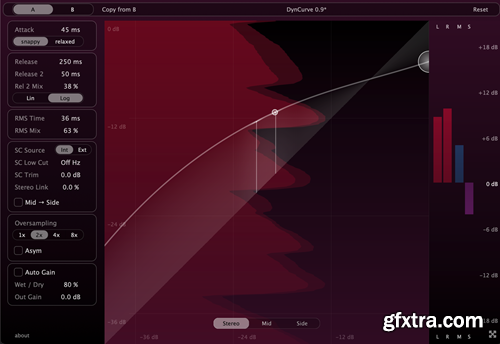
Intuitive workflow Separate curves for Mid and Side Responsive, GPU accelerated UI Multichannel support Curve-based control At the core of DynCurve is a freely editable transfer curve: input level on the X-axis, output level on the Y-axis. Instead of working around fixed thresholds, ratios and knees, you simply shape how the signal responds across its entire dynamic range. Compression, expansion and gain shaping can live on the same curve --- from subtle control to extreme movement. - Compression, expansion and gating on one continuous curve - From soft leveling to extreme compression and creative waveshaping - Quick segment controls for spline and linear curve shapes Three perspectives, one system DynCurve gives you instant access to Stereo, Mid and Side processing, each with its own independent transfer curve. Shape the center and the sides differently, control width through dynamics, and move between perspectives without duplicating plugins or breaking your workflow. - Independent curves for Stereo, Mid and Side What you see is what you shape DynCurve visualizes the control signal that drives the dynamics, showing how the incoming audio is interpreted through attack, release, RMS detection and sidechain filtering. Because the display follows the same signal that is mapped through the transfer curve, every adjustment is reflected instantly --- making it easy to place the curve exactly where the dynamic movement happens. A Stereo-Based Approach to Multichannel Dynamics Instead of treating multichannel audio as a collection of unrelated channels, DynCurve interprets every format as a single, coherent stereo soundstage. This soundstage remains consistent regardless of channel count or speaker layout. Based on this unified soundstage, DynCurve groups stereo channel pairs into a shared spatial image and derives a global Mid and Side signal from it. This allows Mid/Side dynamics processing to be applied across surround and immersive buses---something traditional multichannel processors cannot do. In practice, you can for example use the Side curve to dynamically control the width across an entire surround or immersive bus. - Multichannel editing on a stereo stage - Mid/Side dynamics on surround channels home page: https://fehrenberg-audio.com/dyncurve.html/ 


NeoSkola Bütün Kursları

Udemy Türkçe


Top Rated News
- TheBoudoirDivas All Tutorial
- 126,000 Royalty-Free 3D Models
- CreativeLive Tutorial Collections
- Fasttracktutorials Course
- Chaos Cosmos Library
- MRMockup - Mockup Bundle
- Finding North Photography
- Sean Archer
- John Gress Photography
- Motion Science
- AwTeaches
- Learn Squared
- PhotoWhoa
- Houdini-Course
- Photigy
- August Dering Photography
- StudioGuti
- Creatoom
- Creature Art Teacher
- Creator Foundry
- Patreon Collections
- Udemy - Turkce
- BigFilms
- Jerry Ghionis
- ACIDBITE
- BigMediumSmall
- Globe Plants
- Unleashed Education
- The School of Photography
- Visual Education
- LeartesStudios - Cosmos
- Fxphd
- All Veer Fancy Collection!
- All OJO Images
- All ZZVe Vectors
- CGTrader 1 CGTrader 2



















