

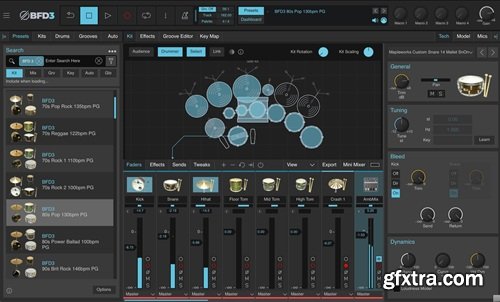
BFD Drums BFD3 v3.5.0.49
Windows | 60.9 MB
BFD 3.5 is the third generation of our flagship software acoustic drum studio: new levels of realism and ground-breaking features in an intuitive redesigned engine. BFD 3.5 is a free update for all BFD 3 users.
Designed for creating great-sounding, realistic acoustic drums. It delivers true, impactful, release-ready sound alongside a host of creative features and significant updates, BFD 3.5 delivers uncompromising detail for the easiest BFD experience yet. NEW UPDATED FEATURES Core library featuring 51 kits 60 mix-ready preset BFD kits with customized parameters, articulations and effects The Drum Editor’s Tech, Model and Mic sections: Users can dampen, tune, create customized mic perspectives, adjust pitch velocity per drum and much more for every sound in your kit. 82 ready to play drum Groove Palettes and dozens of individual grooves are available within the Groove Editor to add unique and instant flavor, feel and realism to your tracks and production process. 48 cutting-edge audio effects, including 13 AIR Music Tech effects that be utilized as either track Inserts or Sends with plenty of AUX channels to work with. AIR Music Tech effects: AIR Compressor, AIR Lo-Fi (Decimator), AIR Distortion, AIR Dyn3 Compressor, AIR Economy Reverb, AIR Expander, AIR Maximizer, AIR Non-Linear Reverb, AIR Saturation Filter, AIR Spring Reverb, AIR Stereo Reverb, AIR Transient, and AIR Tube Drive. New ‘Mics’ control in the Drum Editor panel. Allowing flexible per channel multi-mic level and individual mic attenuation aspects. The updated Mics control panel allows you to further adjust levels and other aspects of your drum sound signals. Revamped GUI – Introducing new icons, new colors, and clearer fonts. Apple Silicon AAX support Cross-platform VST3 support Changelog: v3.5.0 New Features - Apple Silicon AAX support - Cross-platform VST3 support - New 'Mics' sub-panel in the Kitpiece Inspector - A revamped user interface Changes - Revamped user interface (new icons, new colours, and clearer fonts) - Resizable UI - BFD License Manager is now obsolete - Revamped Content & Licenses views, accessible in the main menu - All license and authorization tasks are now performed directly within the plugin - Improved Content scanning mechanisms Content - All expansion packs have add various bug fixes and improvements to meta-data - Fixed any erroneous '-inf' loudness measurements - Fixed unknown library tags - All drums should now have the correct class and sub-class descriptions - The above fixes only apply to the latest downloads of the expansion packs Known Issues - BFD v3.4 will not be able to be installed alongside BFD v3.5 - Existing projects will automatically detect BFD v3.5 - Older expansion packs may not work with BFD v3.5, and in such cases we encourage you to upgrade to the latest versions of your expansion packs by downloading them from the inMusic Software Center. - M1 Pro/M1 Max etc users may need to disable Multi-threaded synthesis and Multi-threaded mixer in Preferences>Engine to avoid BFD crackling in DAWs. - Some 3rd party grooves will show as unauthorized, even though they work. home page: https://www.bfddrums.com/bfd3/ 


126,000 Royalty-Free 3D Model

Udemy Türkçe


Top Rated News
- CreativeLive Tutorial Collections
- Fasttracktutorials Course
- Chaos Cosmos Library
- MRMockup - Mockup Bundle
- Finding North Photography
- Sean Archer
- John Gress Photography
- Motion Science
- AwTeaches
- Learn Squared
- PhotoWhoa
- Houdini-Course
- Photigy
- August Dering Photography
- StudioGuti
- Creatoom
- Creature Art Teacher
- Creator Foundry
- Patreon Collections
- Udemy - Turkce
- BigFilms
- Jerry Ghionis
- ACIDBITE
- BigMediumSmall
- Globe Plants
- Unleashed Education
- The School of Photography
- Visual Education
- LeartesStudios - Cosmos
- Fxphd
- All Veer Fancy Collection!
- All OJO Images
- All ZZVe Vectors
- CGTrader 1 CGTrader 2



















