

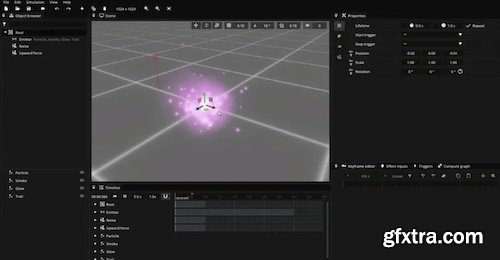
Pixelpart is an easy-to-use and powerful tool for designing 2D and 3D visual effects with plugins for popular game engines, allowing you to seamlessly integrate the effects into your games.
Pixelpart is an application designed for creating stunning visual effects in 2D and 3D. The application utilizes particles as the basic visual elements, and you have complete control over particle movement and appearance. You can even simulate natural forces like gravity, wind, and collisions to create realistic effects. It offers a variety of plugins that enable direct use in game engines. Furthermore, effects can be exported to sprite sheets, videos, image sequences and animated images. The user interface of Pixelpart is composed of several main windows: Scene: The scene view shows the effect in action and a timeline at the bottom. The scene view is interactive, so you may move and manipulate objects while the effect is playing. Timeline: The timeline window shows the current progress of the effect and the timing of objects in the scene. You can pause and restart the effect in this window. Object browser: The object browser shows a list of all objects (particle types, particle emitters, force fields and colliders) in the scene. Properties: The properties window lists the properties of the selected scene object. Keyframe editor: You can animate the selected property in this window. Image effects: The image effects window makes it possible to apply and configure post-processing effects. Effect inputs: You can add inputs to your effect in this window, which is used to supply external data to the effect, primarily when using game engine plugins. Triggers: You can define triggers in this window, which can be used to let external events influence the effect, primarily when using game engine plugins. Compute graph: In the compute graph window you can change how the selected property is computed from the defined effects inputs. Home Page - https://pixelpart.net/documentation/book/index.html



126,000 Royalty-Free 3D Model

Udemy Türkçe


Top Rated News
- CreativeLive Tutorial Collections
- Fasttracktutorials Course
- Chaos Cosmos Library
- MRMockup - Mockup Bundle
- Finding North Photography
- Sean Archer
- John Gress Photography
- Motion Science
- AwTeaches
- Learn Squared
- PhotoWhoa
- Houdini-Course
- Photigy
- August Dering Photography
- StudioGuti
- Creatoom
- Creature Art Teacher
- Creator Foundry
- Patreon Collections
- Udemy - Turkce
- BigFilms
- Jerry Ghionis
- ACIDBITE
- BigMediumSmall
- Globe Plants
- Unleashed Education
- The School of Photography
- Visual Education
- LeartesStudios - Cosmos
- Fxphd
- All Veer Fancy Collection!
- All OJO Images
- All ZZVe Vectors
- CGTrader 1 CGTrader 2



















