

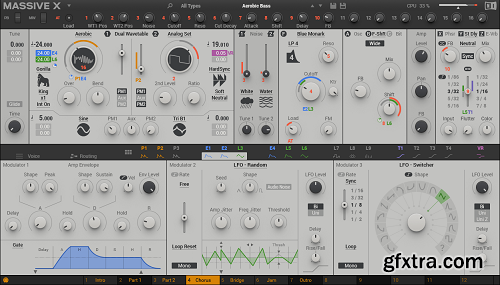
Native Instruments Massive X v1.7.0
Windows | AAX VST3 VST | 1.8 GB
NEXT-GENERATION FLAGSHIP SYNTHESIZER
Immaculate sound and complete sonic freedom for advanced sound design
Create with a new level of dynamic, shifting sound, with truly flexible routing and extensive modulation
Based on the DNA of MASSIVE, built for a new decade and designed to evolve
THE (RE)BIRTH OF A LEGEND Rethought, rewired, and reincarnated – MASSIVE X is the successor to an iconic synthesizer that helped spawn entire genres. Get everything you need to create any sound imaginable. Quickly patch complex routings to bring your ideas to life – no matter how far-out they might seem – and take things further than you thought you could with expressive, playable modulation. Think it up, dial it in, and define what the future sounds like. MASSIVE X will grow, adapt, and evolve with regular free updates – both inspired by, and to inspire, the cultures it helps to create. included expansions: 140 Bass, Ambient Atmospheres, Bass Music Essentials, Beam, Bounce, Bump, Charge, Cinematic Hits, Cinematic Risers, Cinematic Soundscapes, Creative Chords, Darkwave Pads, Drive, Fade, Haze, Hyperpop Leads, Industrial Bass, Kino, Lo-fi and Chill Plucks, Massive X Factory, Mechanix, Melodic Techno Bass, Moebius, Now, Our House, Pulse, Quest, Rush, Scene, Scoring Sequences, Synthwave Leads, Trap Bells, Wake Release Notes v1.7.0: ADDED Exposed all parameters to host automation ADDED Menu option to invert X and Y Morpher pad values to align with hardware controllers ADDED Animator lock, allows locking of animator settings when switching presets ADDED Cursor hiding on Mac, except in Apple Hosts ADDED Update notification ADDED Menu option to enable and disable update notification REMOVED Internal automation of Mod Wheel, Pitch Bend and Aftertouch FIXED A potential crash in logic when modulating macros FIXED Favourites, User icon and Wavetable submenu selection stealing keyboard focus in Windows FIXED Text search stealing keyboard focus even after parameters had been changed FIXED Pitch bend param in automation list didnt't control pitch bend by default FIXED Hover states for delay time parameters FIXED Play page briefly showing on init even when 'default to edit view' was enabled FIXED 'Load Init Preset' option caused a switch in page view FIXED Retrigger on the Play page sent on/off events incorrectly IMPROVED Cursor re-appearance after changing a control IMPROVED Animation smoothness by enabling VSync, this can be controlled by the Sync Monitor To Refresh Rate option in the menu IMPROVED ‘More Expansions’ tab links to Massive X Expansion overview in Native Access KNOWN ISSUE Discrete parameters (e.g. switches, menus, tables) cannot be learned or recorded, but can be drawn in the automation lane in Logic, MainStage and Garageband home page: https://www.native-instruments.com/massive-x 


126,000 Royalty-Free 3D Model

Udemy Türkçe


Top Rated News
- CreativeLive Tutorial Collections
- Fasttracktutorials Course
- Chaos Cosmos Library
- MRMockup - Mockup Bundle
- Finding North Photography
- Sean Archer
- John Gress Photography
- Motion Science
- AwTeaches
- Learn Squared
- PhotoWhoa
- Houdini-Course
- Photigy
- August Dering Photography
- StudioGuti
- Creatoom
- Creature Art Teacher
- Creator Foundry
- Patreon Collections
- Udemy - Turkce
- BigFilms
- Jerry Ghionis
- ACIDBITE
- BigMediumSmall
- Globe Plants
- Unleashed Education
- The School of Photography
- Visual Education
- LeartesStudios - Cosmos
- Fxphd
- All Veer Fancy Collection!
- All OJO Images
- All ZZVe Vectors
- CGTrader 1 CGTrader 2



















