

DoublePi Vovious v1.0.10
Windows | AAX AU VST3 SAL | 20 MB
The User Interface
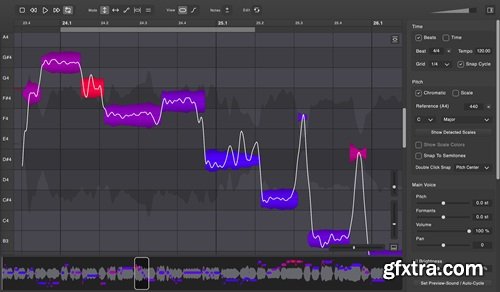
Vovious offers you a modern user interface, which perfectly integrates into your DAW.
The Notes The colors of the notes show you the deviation from the correct pitch so that you have a good indication of where to start with the correction. The Main Tools Vovious provides you modern user controls to change the pitch, slope, vibrato, formants and amplitude of the notes. Pitch Drawing The Pitch Drawing Mode gives you the flexibility to draw everything on the pitch track. Temporary Note The temporary note lets you easily make changes at the microlevel. You define the start and end. Timing When editing the timing of your song, the colors of the vertical lines show how the notes fit the beat. Sibilants Editing Vovious lets you edit the amplitude of sibilants, noise and breathes (marked as dark areas in the waveform). ARA Plugin Extension In an ARA-compatible DAW, Vovious receives your vocal track immediately and follows the clip changes of your DAW. Even changes at the transport, cycle, beat and tempo are synchronized. Scale Detection Vovious automatically detects the scale of your vocal recording. You can use this scale to tune the notes and optionally display the corresponding colors. MIDI Reference Tuning If you already have your vocal melody as MIDI, you can import it simply by dragging a MIDI file to Vovious. Now you can use this reference to tune the notes along. Multi Track Editing Vovious lets you edit multiple tracks in one window. You can switch between tracks using the TrackSwitcher. The other tracks can be displayed as a reference with the track color of your DAW. The colors help you to see which notes belong to which track. Neural Network Pitch Detection Accurate pitch detection is essential for perfect vocal tuning. Vovious uses state of the art neural network technology to achieve best results without any cloud service. Everything is calculated on your computer and stays there. Release Notes Version 1.0.10 (2025-02-03): - Added: Support for non-latin characters in the track name (e.g., Chinese, Japanese) - Added: The ability to drag a manually created activation file onto Vovious for users experiencing issues with their internet connection - Logic Pro: Fixes a presentation (GUI) latency bug of the playhead/cursor - Fixes a bug that could cause Vovious to crash or stop playing audio in rare cases with high pitched vocals - Fixes another crash that could occur when moving notes beyond the DAW clip boundaries during time editing home page: https://www.vovious.com 


NeoSkola Bütün Kursları

Udemy Türkçe


Top Rated News
- TheBoudoirDivas All Tutorial
- 126,000 Royalty-Free 3D Models
- CreativeLive Tutorial Collections
- Fasttracktutorials Course
- Chaos Cosmos Library
- MRMockup - Mockup Bundle
- Finding North Photography
- Sean Archer
- John Gress Photography
- Motion Science
- AwTeaches
- Learn Squared
- PhotoWhoa
- Houdini-Course
- Photigy
- August Dering Photography
- StudioGuti
- Creatoom
- Creature Art Teacher
- Creator Foundry
- Patreon Collections
- Udemy - Turkce
- BigFilms
- Jerry Ghionis
- ACIDBITE
- BigMediumSmall
- Globe Plants
- Unleashed Education
- The School of Photography
- Visual Education
- LeartesStudios - Cosmos
- Fxphd
- All Veer Fancy Collection!
- All OJO Images
- All ZZVe Vectors
- CGTrader 1 CGTrader 2



















