

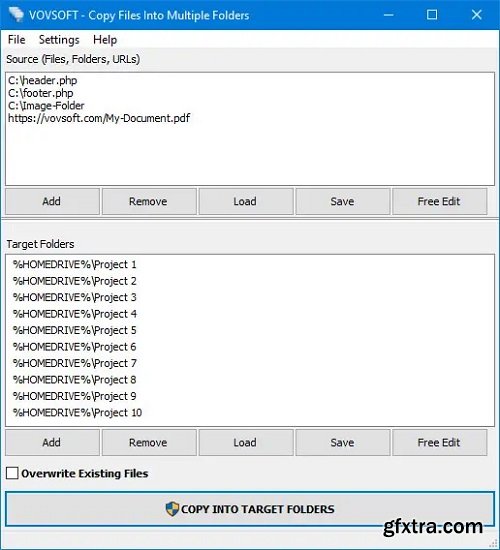
Copy one or multiple files to several folders, with or without overwriting existing content, with this lightweight, easy-to-use program. If you often need to copy a large number of files to multiple locations, performing this task the old-fashioned way is both tedious and time-consuming.
Copy Files Into Multiple Folders is a handy piece of software that, as its name implies, enables you to copy files to multiple directories in one quick operation. It is very simple-to-use. This application is great for those who only wish to transfer a set of files to multiple directories in an effortless manner. First-time users should not run into any issues, as the programs functions are self-explanatory.
Files can be added to the list using drag and drop actions, and you can specify whether or not existing items should be replaced. A processing log is displayed in a separate window after the operation has been launched. It lets you know which files have been copied or skipped.
Operating System: Windows 10/8.1/8/7/Vista/XP
Home Page - https://vovsoft.com/


126,000 Royalty-Free 3D Model

Udemy Türkçe


Top Rated News
- CreativeLive Tutorial Collections
- Fasttracktutorials Course
- Chaos Cosmos Library
- MRMockup - Mockup Bundle
- Finding North Photography
- Sean Archer
- John Gress Photography
- Motion Science
- AwTeaches
- Learn Squared
- PhotoWhoa
- Houdini-Course
- Photigy
- August Dering Photography
- StudioGuti
- Creatoom
- Creature Art Teacher
- Creator Foundry
- Patreon Collections
- Udemy - Turkce
- BigFilms
- Jerry Ghionis
- ACIDBITE
- BigMediumSmall
- Globe Plants
- Unleashed Education
- The School of Photography
- Visual Education
- LeartesStudios - Cosmos
- Fxphd
- All Veer Fancy Collection!
- All OJO Images
- All ZZVe Vectors
- CGTrader 1 CGTrader 2



















