

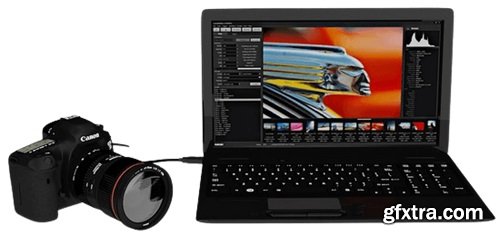
ControlMyCanon 5.6.98.99 Multilingual | 47.8 MB [REUPLOADED]
Control your Camera with your PC. Unleash your Canon DSLR Today. Save Time and Money with Advanced Workflows. Get the Shot with our Easy Triggers. Used by thousands of photographers in studios, movie sets, museums, laboratories, schools and backyards worldwide.
Compose the Perfect Shot with Live View Review and Analyze Your Images Reduce Eye Fatigue Remotely Adjust Settings and Shoot - Shutter Speed And when you are ready to shoot, just click on the Shoot buttons or use the camera shutter release, mouse, keyboard or one of our configurable triggers. And if you would like to re-use these particular settings later, save them as a Profile. You can use profiles to quickly restore all your settings instead of setting each item again. Save Time with Workflows - HDR - Capture a series of images with varying shutter speed. A Trigger for Every Occasion - Web – shoot from your smartphone or browser. Perfect for when you need a remote. Prolific Profiles Windowed Wonderful...ness Integrate it Marvelous Metadata Copystand Clarity Calibrate White Balance Take the Shortcut Multi-threaded Performance Use a DSUSB Use a Stackshot SDK Satisfaction It's Pretty Print it System Requirements
Reduce re-shoots and post-processing by using live view in a window or full-screen or even on another monitor to make sure your composition and exposure is perfect before you take the shot. You can even capture an image with motion detection. Remotely autofocus or manually adjust the focus without touching the camera. Includes copystand mode, compositional guides, focus peaking, inner and outer exposure markers, overlays, slide simulation, jitter reduction, rotation overrides and cropping. And if you are shooting with strobes and find the live view is too dark, you can bump up the brightness so that you can compose with ease.
Use the built-in Image Browser to check your focus, exposure, composition and metadata. You can even detach it or spawn a second image browser and put it on another monitor.
Select from over 100 color themes to find a look that is best for you.
With tethering, you avoid the problem of bumping your carefully composed shot when you need to adjust camera settings. All you need to do is point and click to adjust your settings on the ControlMyCanon screen and you are good to go.
- Aperture
- Compensation
- ISO
- Exposure Mode (Manual, Aperture, Shutter)
- Exposure Delay
- White Balance
- Image Format
Use our powerful workflows to guide you through complex image capture scenarios.
- Bulb – Capture an image using bulb mode.
- Burst – Quickly capture a series of images using continuous mode.
- Pulse – Capture an image every x seconds.
- Batch – Embed your own data into image folder/filenames and IPTC fields. Can be used with a barcode reader.
- Time-lapse – Capture a series of images over time.
- Stop-motion – Capture a series image for making a stop-motion video.
- Long Exposure – Capture a very long exposure.
- Focus Stacking – Capture a series of images of limited depth of field that can be combined for greater depth of field.
Use our powerful triggers to get those hard to get shots.
- Sound – shoot when a noise is detected.
- TCP/IP – shoot when a command is received from a custom app.
- Speech – shoot when you speak a word or phrase. Great for hand-holding lights and shooting at the same time.
- Motion – shoot when motion is detected during live view. Now you can literally capture images of those elusive backyard birds while you are off doing something else. Many of our users do this, with great results.
- Powerpoint Remote – shoot when a button is pressed. A great inexpensive remote that can be used during live view.
Make changes to the camera settings and then save it as a profile. You can have as many profiles as you like and switch profiles when needed. This saves a lot of time.
Detach the live view, image browser, or both and arrange them on other monitors. Or clone the live view and image browser windows so that they can exist on separate monitors.
Send commands to ControlMyCanon via your own app, or send each image after capture for further post-processing via batch file.
Embed your own data into IPTC fields for each image. If using the Batch Workflow, you can even embed data from your barcode or linked data.
Use live view’s Copystand mode so that you can easily compose by moving the subject on the copystand. Move it right and moves right in live view, etc.
Easily capture and assign a white balance to your custom white balance settings. Use a white or grey card of your choice.
Use the built-in shortcuts and customize your own for pretty well every function.
Camera communication image processing run on their own threads for maximum performance on multi-core cpu’s.
Capture images by using a separate DSUSB device. Great for long-exposure captures for those cameras that don’t allow tethered bulb shooting.
Use the StackShot motorized rail to move your camera for focus stacking. Great if you don’t have a lens with a CPU-controlled focus motor.
Uses Canon’s official Software Development Kit so you know that the camera is controlled in a safe, Canon-approved manner.
Customize the look and feel by choosing from over 100 themes and adjustable font sizes. Your eyes will be much happier.
Print contact sheets right from the image browser.
Windows 7, 8, 8.1, 10 or 11 (32 or 64 bit)



126,000 Royalty-Free 3D Model

Udemy Türkçe


Top Rated News
- CreativeLive Tutorial Collections
- Fasttracktutorials Course
- Chaos Cosmos Library
- MRMockup - Mockup Bundle
- Finding North Photography
- Sean Archer
- John Gress Photography
- Motion Science
- AwTeaches
- Learn Squared
- PhotoWhoa
- Houdini-Course
- Photigy
- August Dering Photography
- StudioGuti
- Creatoom
- Creature Art Teacher
- Creator Foundry
- Patreon Collections
- Udemy - Turkce
- BigFilms
- Jerry Ghionis
- ACIDBITE
- BigMediumSmall
- Globe Plants
- Unleashed Education
- The School of Photography
- Visual Education
- LeartesStudios - Cosmos
- Fxphd
- All Veer Fancy Collection!
- All OJO Images
- All ZZVe Vectors
- CGTrader 1 CGTrader 2



















