

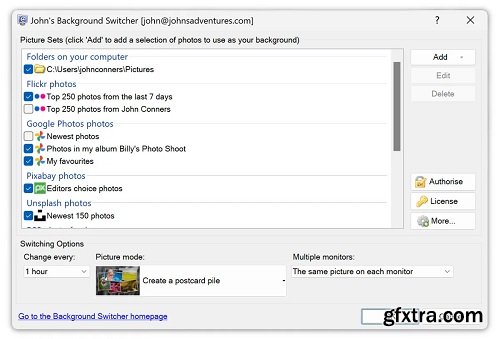
JBS sits in your system tray (down by the clock) and changes your background at the time interval of your choosing. You tell it where to get pictures from and how to show them – maybe you just want to see one photo at a time or maybe you’d like to see a ‘Snapshot Scrapbook‘ of photos thrown across your desktop. It’s up to you and you never know what’s coming next!
You add as many pictures sets from as many different places you like to the list and decide how you want them shown. Additional fine-tuning options are available from the ‘More Settings’ dialog where you can tweak till you heart’s content. Maybe you want a 3-month calendar on your desktop, your backgrounds always to be sepia or a cork noticeboard look – whatever you want is probably there.
Home Page - https://johnsad.ventures/software/backgroundswitcher/windows/


126,000 Royalty-Free 3D Model

Udemy Türkçe


Top Rated News
- CreativeLive Tutorial Collections
- Fasttracktutorials Course
- Chaos Cosmos Library
- MRMockup - Mockup Bundle
- Finding North Photography
- Sean Archer
- John Gress Photography
- Motion Science
- AwTeaches
- Learn Squared
- PhotoWhoa
- Houdini-Course
- Photigy
- August Dering Photography
- StudioGuti
- Creatoom
- Creature Art Teacher
- Creator Foundry
- Patreon Collections
- Udemy - Turkce
- BigFilms
- Jerry Ghionis
- ACIDBITE
- BigMediumSmall
- Globe Plants
- Unleashed Education
- The School of Photography
- Visual Education
- LeartesStudios - Cosmos
- Fxphd
- All Veer Fancy Collection!
- All OJO Images
- All ZZVe Vectors
- CGTrader 1 CGTrader 2



















