

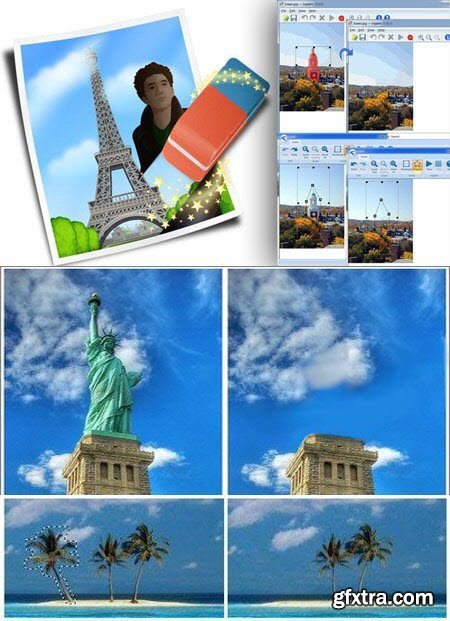
Teorex Inpaint 9.0 Multilingual | 19.58 MB
Inpaint will magically fill the selected area with intelligently-generated textures pulled from the surrounding image data. Inpaint photo restoration software reconstructs the selected image area from the pixels near the area boundary. Remove undesirable objects from your images, such as logos, watermarks, power lines, people, text or any other undesired artefacts. There's no need to manually go through messing around with your old clone tool any more! Now you can use Inpaint to easily remove all those unexpected objects that end up spoiling an otherwise really great photograph.
Top Reasons to use Inpaint
- Repair old photos
- Remove watermarks
- Erasing Power Lines
- Remove unwanted objects
- Digital Facial retouching
- Remove date stamps
- Erase wrinkles and skin blemishes
- Remove tourists from travel photos
- Fill black areas of a panorama
- Remove text or logo from images
- Easy to get use & started
- Completely non-technical
Operating System:
Windows® 10, Windows® 8 / 8.1, Windows® 7
Home Page - http://www.theinpaint.com/
Language: Multilingual


Related Posts
Information
Members of Guests cannot leave comments.
NeoSkola Bütün Kursları

Udemy Türkçe


Top Rated News
- TheBoudoirDivas All Tutorial
- 126,000 Royalty-Free 3D Models
- CreativeLive Tutorial Collections
- Fasttracktutorials Course
- Chaos Cosmos Library
- MRMockup - Mockup Bundle
- Finding North Photography
- Sean Archer
- John Gress Photography
- Motion Science
- AwTeaches
- Learn Squared
- PhotoWhoa
- Houdini-Course
- Photigy
- August Dering Photography
- StudioGuti
- Creatoom
- Creature Art Teacher
- Creator Foundry
- Patreon Collections
- Udemy - Turkce
- BigFilms
- Jerry Ghionis
- ACIDBITE
- BigMediumSmall
- Globe Plants
- Unleashed Education
- The School of Photography
- Visual Education
- LeartesStudios - Cosmos
- Fxphd
- All Veer Fancy Collection!
- All OJO Images
- All ZZVe Vectors
- CGTrader 1 CGTrader 2



















