

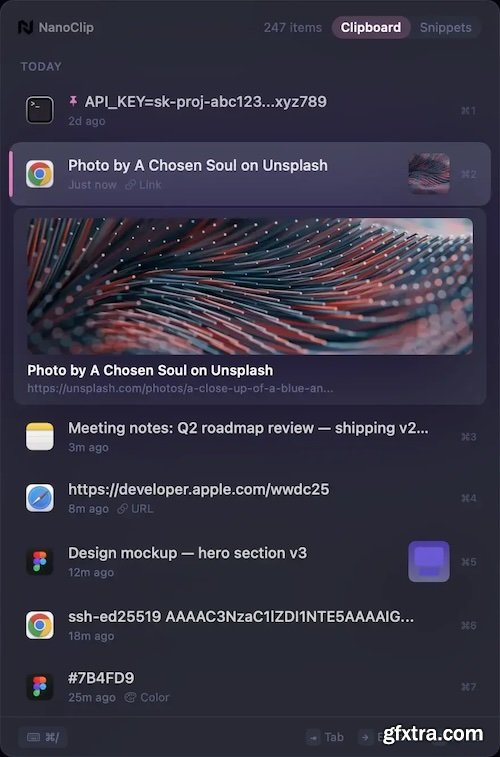
NanoClip is a lightweight macOS menu bar clipboard manager that saves every copy and keeps snippets instantly accessible with a global shortcut. It supports clipboard history, smart text snippets, iCloud sync across Macs, inline previews for images, GIFs, files, colors, and code, plus multiple themes in a fast, privacy-focused design.
Clipboard history that remembers everything.
Scroll back through everything you've copied — text, links, images, code. Search instantly, paste with a keystroke.
Smart text snippets that type themselves.
Create snippets with dynamic placeholders — current date, clipboard contents, or custom fields you fill in before pasting. A free TextExpander alternative built into your clipboard manager.
Three keystrokes. Full paragraph.
Assign a keyword like @sig or @addr to any snippet. Type it in any app and it expands instantly — no hotkey needed.
Tweak before you paste.
Press ⌘E to edit any item inline. Fix a typo, update a value, adjust the text — then paste the modified version.
iCloud clipboard sync across every Mac.
Your clipboard history and snippets sync across all your Macs via iCloud. No setup, no accounts, no servers — just sign in with the same Apple ID.
Know your habits.
Track daily streaks, busiest hours, top apps, and content types. Your clipboard, visualized.
URLs come alive.
Copied links show titles, favicons, and OG images automatically. Even bot-protected sites.
Keyboard-first workflow.
Navigate, search, expand, edit, and paste — all from the keyboard. Arrow keys, type-to-search, global hotkeys. Your mouse can rest.
Pin what matters.
Keep frequently used items at the top. They stay pinned even as new copies come in.
Paste in sequence.
Queue up multiple items and paste them one by one in order. Perfect for filling out forms.
19 themes and 14 fonts.
Catppuccin, Nord, Dracula, Tokyo Night, Liquid Glass — match your editor or go full Hacker mode.
Not just text.
Images, GIFs, files, colors, code — NanoClip handles them all with inline previews and thumbnails.
Hide sensitive content.
Obfuscate passwords, API keys, or personal data. Hidden items stay in history but stay private.
System Requirements:
• macOS 15 or later
• Apple Silicon or Intel Core processor
Home Page - https://www.getnano.dev/clip


NeoSkola Bütün Kursları

Udemy Türkçe


Top Rated News
- TheBoudoirDivas All Tutorial
- 126,000 Royalty-Free 3D Models
- CreativeLive Tutorial Collections
- Fasttracktutorials Course
- Chaos Cosmos Library
- MRMockup - Mockup Bundle
- Finding North Photography
- Sean Archer
- John Gress Photography
- Motion Science
- AwTeaches
- Learn Squared
- PhotoWhoa
- Houdini-Course
- Photigy
- August Dering Photography
- StudioGuti
- Creatoom
- Creature Art Teacher
- Creator Foundry
- Patreon Collections
- Udemy - Turkce
- BigFilms
- Jerry Ghionis
- ACIDBITE
- BigMediumSmall
- Globe Plants
- Unleashed Education
- The School of Photography
- Visual Education
- LeartesStudios - Cosmos
- Fxphd
- All Veer Fancy Collection!
- All OJO Images
- All ZZVe Vectors
- CGTrader 1 CGTrader 2



















