

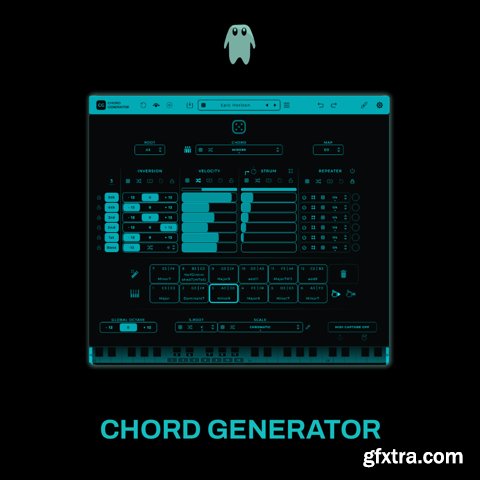
Mario Nieto Chord Generator 1.1.1 macOS | U2B | 58.51 MB
Chord Generator is an innovative tool for crafting complex harmonies and dynamic rhythms. With features like retrigger mode, strumming, and note repetition, this versatile plugin inspires creativity and streamlines workflows for musicians and producers at any level.
Chord Generator offers a rich chord library, allowing you to select from a wide variety of chord types to suit any genre or mood. With retrigger mode, each pad trigger generates fresh variations, while intuitive navigation ensures smooth exploration of creative possibilities. Take full control of your harmonies with advanced voicing, strumming, and repetition features. Customize up to six voices, including a bass voice, with options to activate or deactivate components individually. Strum functionality introduces rhythmic depth by applying progressive or randomized delays between notes, creating dynamic and organic textures. The Repeater Option adds even more flexibility, enabling repeated notes at custom intervals for intricate rhythmic patterns. These tools, combined with inversion randomization, voice linking, and locking, offer unparalleled precision. Expand your harmonic palette with scale and root customization. Choose from 57 scales, randomize the root note for unexpected combinations, and visualize your choices on a keyboard display. The bass voice provides depth and variation, with transposition and retriggering features to evolve your sound further. Effortlessly capture your creativity with MIDI Capture and Export, allowing seamless recording of MIDI output. Drag and drop sequences directly into your DAW for a streamlined workflow, or use the plugin’s built-in tools for precise adjustments. The customizable interface includes a color editor, preset management tools, and intuitive navigation. Strum and Repeater settings can sync with your DAW’s tempo or operate in freeform mode, giving you total control over timing and rhythm. Undo/redo functionality and a bypass mode ensure flexibility during production. Make It Yours Tweak, shape, and personalize Chord Generator. Create your own skins, save them, share them, make them yours. → Key Features: Extensive Chord Library • Chord Type Selection: Choose from a wide variety of chord types to suit any musical genre or mood. • Random Chord Generation: Instantly generate random chord types to spark new ideas. • Chord Variation Retriggering: Enable retrigger mode to get a new chord variation each time a pad is triggered. • Next/Previous Chord Navigation: Easily browse through chord types with simple navigation controls. Advanced Voicing and Inversion Control • Individual Voice Activation: Activate or deactivate up to five voices and a bass voice for each chord. • Inversion Randomization: Randomize chord inversions by selecting octaves randomly for each voice. • Voice Linking and Locking: Link voices to adjust parameters simultaneously or lock them to prevent changes. • Reset and Retrigger Options: Reset inversions to default or enable retriggering for new variations on each trigger. Dynamic Velocity and Timing • Velocity Randomization: Randomize velocities for each voice to add a human feel to your chords. • Delay Randomization: Introduce random delays for each voice to create unique rhythmic patterns. • Range Controls: Set specific ranges for velocity and delay randomization to maintain control over dynamics. • Linking and Locking: Similar to voicing, velocities and delays can be linked or locked across voices. Scale and Root Customization • Global Scale Selection: Choose the scale mode and root note, applied globally across all pads. • Random Scale and Root: Randomize the scale and root note to explore new harmonic territories. • Retrigger Options: Enable retriggering to select a new scale or root note each time a pad is triggered. • Scale Keyboard Display: Visualize the selected scale on a keyboard for easy reference. Bass Voice Enhancements • Active Bass Voice: Add depth to your chords with an active bass voice, positioned an octave or two lower. • Bass Transposition: Transpose the bass note by semitones to fine-tune the harmony. • Bass Retriggering: Enable bass retriggering for new bass transpose variations on each pad trigger. User-Friendly Interface and Workflow • Pad Selection and Triggering: Play chords by selecting pads, with the option to trigger chords upon selection. • MIDI Mapping: Map pads to specific MIDI notes or use Single Chord Mode to play chords across the keyboard. • Auto-Generate Pads: Instantly generate unique chords for each pad with individual characteristics. • Global Randomization: Randomize permitted parameters globally to explore endless harmonic possibilities. MIDI Capture and Export • MIDI Capture: Record MIDI output effortlessly by activating MIDI Capture. Recording starts when your DAW is in ‘Play’ mode or immediately in Standalone mode. • Export and Drag & Drop: Export captured MIDI sequences to a specified location or drag and drop directly into your DAW or desired destination. Customizable Aesthetics • Color Editor: Personalize the look of Chord Generator with the built-in color editor. • Default Skin Setting: Set your custom colors as the default skin for a personalized experience every time. • Random Color Generator: Randomize the interface colors for a fresh new look. • Import/Export Skins: Save and share your custom looks with easy import and export options. Presets Management • Save and Load Presets: Save your favorite settings and load them anytime. • Preset Navigation: Quickly switch between presets with next, previous, and random selection options. • Reset to Defaults: Reset all parameters to their default values with a single click. Essential Controls • Undo/Redo: Easily revert or reapply actions to fine-tune your settings. • Bypass Mode: Quickly bypass the plugin to let MIDI signals pass through unaffected. • Settings and Info Windows: Access detailed settings and information to get the most out of Chord Generator. Compatibility and Ease of Use • Standalone and Plugin Versions: Use Chord Generator as a standalone application or within your favorite DAW. • Drag and Drop Support: Import custom look files or export MIDI sequences with intuitive drag-and-drop functionality. • Keyboard Displays: Visualize chords and scales on virtual keyboards for better understanding and creativity. Supported Operation System • macOS 10.13 or later • Apple Silicon or Intel Core processor Homepage: https://marionietoworld.com/chord-generator/ 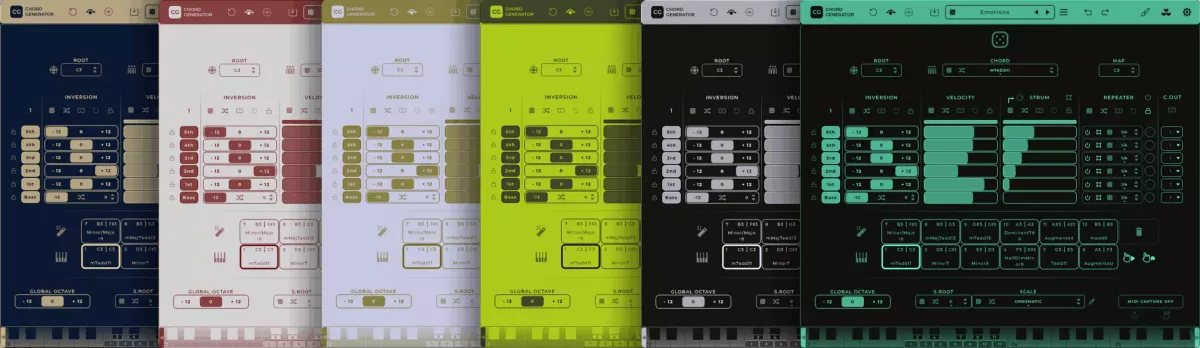



126,000 Royalty-Free 3D Model

Udemy Türkçe


Top Rated News
- CreativeLive Tutorial Collections
- Fasttracktutorials Course
- Chaos Cosmos Library
- MRMockup - Mockup Bundle
- Finding North Photography
- Sean Archer
- John Gress Photography
- Motion Science
- AwTeaches
- Learn Squared
- PhotoWhoa
- Houdini-Course
- Photigy
- August Dering Photography
- StudioGuti
- Creatoom
- Creature Art Teacher
- Creator Foundry
- Patreon Collections
- Udemy - Turkce
- BigFilms
- Jerry Ghionis
- ACIDBITE
- BigMediumSmall
- Globe Plants
- Unleashed Education
- The School of Photography
- Visual Education
- LeartesStudios - Cosmos
- Fxphd
- All Veer Fancy Collection!
- All OJO Images
- All ZZVe Vectors
- CGTrader 1 CGTrader 2



















