

https://superhivemarket.com/products/render-raw
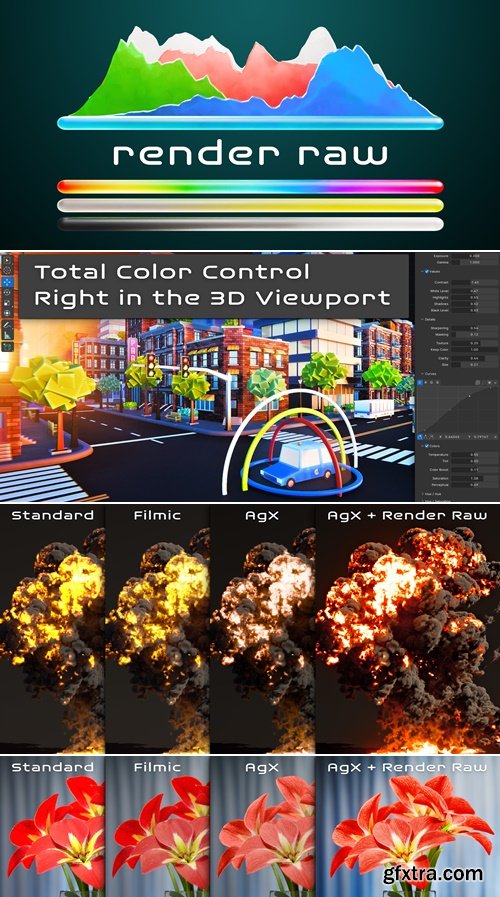
- The advanced color workflow in Blender is far from straightforward or intuitive, which leaves some artists unsatisfied with their results. Read on to discover why this is the case and how Render Raw will save you hours of work and can get you better-looking renders with just a few clicks.
How to Get Vibrant Colors with Blender You can render incredible colors directly in Blender, and the secret to it is the mysterious Raw view transform that most people ignore. A view transform is how Blender can display your render correctly on your screen. A 3D scene can have arbitrarily bright lights, but your monitor or phone screen can only get so bright, so the values of the colors in your render need to be transformed to fit within the constraints of the display. AgX is Blender's newest view transform for rendering and it's incredible at preserving details on brightly lit and / or highly saturated surfaces. However, many find AgX (and its predecessor, Filmic) to appear too dull, washed out, or desaturated. The reason for this is that the result of AgX or Filmic is not necessarily the final step in the production of the image. What you get out of Blender when rendering with AgX is a bit like what you get out of a nice camera when shooting in a detail preserving format. 


126,000 Royalty-Free 3D Model

Udemy Türkçe


Top Rated News
- CreativeLive Tutorial Collections
- Fasttracktutorials Course
- Chaos Cosmos Library
- MRMockup - Mockup Bundle
- Finding North Photography
- Sean Archer
- John Gress Photography
- Motion Science
- AwTeaches
- Learn Squared
- PhotoWhoa
- Houdini-Course
- Photigy
- August Dering Photography
- StudioGuti
- Creatoom
- Creature Art Teacher
- Creator Foundry
- Patreon Collections
- Udemy - Turkce
- BigFilms
- Jerry Ghionis
- ACIDBITE
- BigMediumSmall
- Globe Plants
- Unleashed Education
- The School of Photography
- Visual Education
- LeartesStudios - Cosmos
- Fxphd
- All Veer Fancy Collection!
- All OJO Images
- All ZZVe Vectors
- CGTrader 1 CGTrader 2



















