

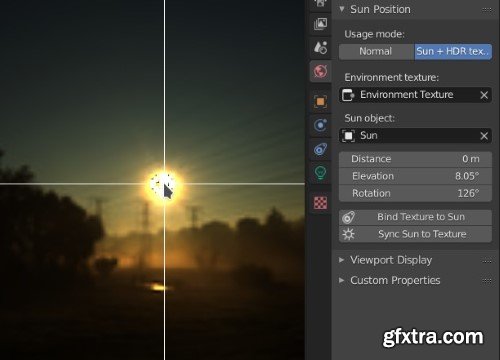
Sun Position allows positioning and animating the Sun (to a certain degree of accuracy), to simulate real-world natural lighting. It uses physical characteristics to position the Sun in the scene: geographic location, time and date. It is based on the National Oceanic and Atmospheric Administration’s (NOAA) online calculator.
This add-on has two distinct modes of operation: the Sun Object Mode allows you to animate the Sun realistically, while the Environment Mode is useful for synchronizing a sun light to an environment texture. This is the mode by default. After selecting the time and place, you can set up a sun light, a sky texture, and a collection to serve as visualization. They will be positioned or animated by choosing a date, time and place on Earth. Instead of simulating the position of the Sun for a real location and time, this mode simply locks an environment texture with a sun light object. They are synchronized and will rotate at the same time. It is useful if you want to increase the contrast in an environment texture by using an additional sun.
Usage
Sun Object Mode
Environment Mode



126,000 Royalty-Free 3D Model

Udemy Türkçe


Top Rated News
- CreativeLive Tutorial Collections
- Fasttracktutorials Course
- Chaos Cosmos Library
- MRMockup - Mockup Bundle
- Finding North Photography
- Sean Archer
- John Gress Photography
- Motion Science
- AwTeaches
- Learn Squared
- PhotoWhoa
- Houdini-Course
- Photigy
- August Dering Photography
- StudioGuti
- Creatoom
- Creature Art Teacher
- Creator Foundry
- Patreon Collections
- Udemy - Turkce
- BigFilms
- Jerry Ghionis
- ACIDBITE
- BigMediumSmall
- Globe Plants
- Unleashed Education
- The School of Photography
- Visual Education
- LeartesStudios - Cosmos
- Fxphd
- All Veer Fancy Collection!
- All OJO Images
- All ZZVe Vectors
- CGTrader 1 CGTrader 2



















