

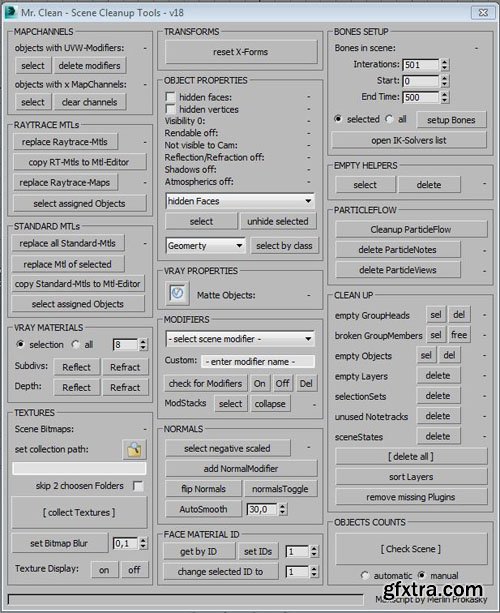
Mr.Clean - Scene Cleanup Tools for Max & VRay
2 MSE | MS | 287 KB
Functions:
– clear MapChannels
– replace RaytraceMaterials by VRayMaterials
– replace Raytrace-Maps by VRayMaps
– replace Standard-Materials by VRayMaterials
– setup VRayMaterial subdivisions and depth of reflection and refraction for multiple materials
– collect textures and relink
– set Bitmap blur value for multiple materials
– reset XForm for multiple objects and keep hierarchy
– find and change objects by objectProperties
– find objects by VRayProperty
– setup all VRayProperties with presets
– find by modifier
– check normals and find negative scaled objects
– autosmoothing
– find and set faceMaterialIDs
– bone setup for Ik solvers
– clear ParticleNodes
– find and remove empty helfer, groupHeads, objects, layers and notetracks
– sort layers
– remove missing plugins
Install:
– unpack rar-archive
– copy all files to your user folder:
e.a: C:Users”Username”AppDataLocalAutodesk3dsMax”2015 – 64bit”ENU (replace “Username” by your own username and “2015 – 64bit” by your actual 3dsMax version!)
– run merlinScripts_MrCleanLoader.ms to evalutate the macroScript
– got to the “Toolbars” tab under Customize/Customize User Interface
– under “Category” you will find “merlinScripts”
– select/pull the Mr Clean icon into you toolbar
– enjoy


NeoSkola Bütün Kursları

Udemy Türkçe


Top Rated News
- TheBoudoirDivas All Tutorial
- 126,000 Royalty-Free 3D Models
- CreativeLive Tutorial Collections
- Fasttracktutorials Course
- Chaos Cosmos Library
- MRMockup - Mockup Bundle
- Finding North Photography
- Sean Archer
- John Gress Photography
- Motion Science
- AwTeaches
- Learn Squared
- PhotoWhoa
- Houdini-Course
- Photigy
- August Dering Photography
- StudioGuti
- Creatoom
- Creature Art Teacher
- Creator Foundry
- Patreon Collections
- Udemy - Turkce
- BigFilms
- Jerry Ghionis
- ACIDBITE
- BigMediumSmall
- Globe Plants
- Unleashed Education
- The School of Photography
- Visual Education
- LeartesStudios - Cosmos
- Fxphd
- All Veer Fancy Collection!
- All OJO Images
- All ZZVe Vectors
- CGTrader 1 CGTrader 2



















