

https://www.coloristfoundry.com/filmverse-film-emulation
*A comprehensive project dedicated to scene-referredfilm emulations and a look development toolkit, designed to leverage digital film infrastructures.
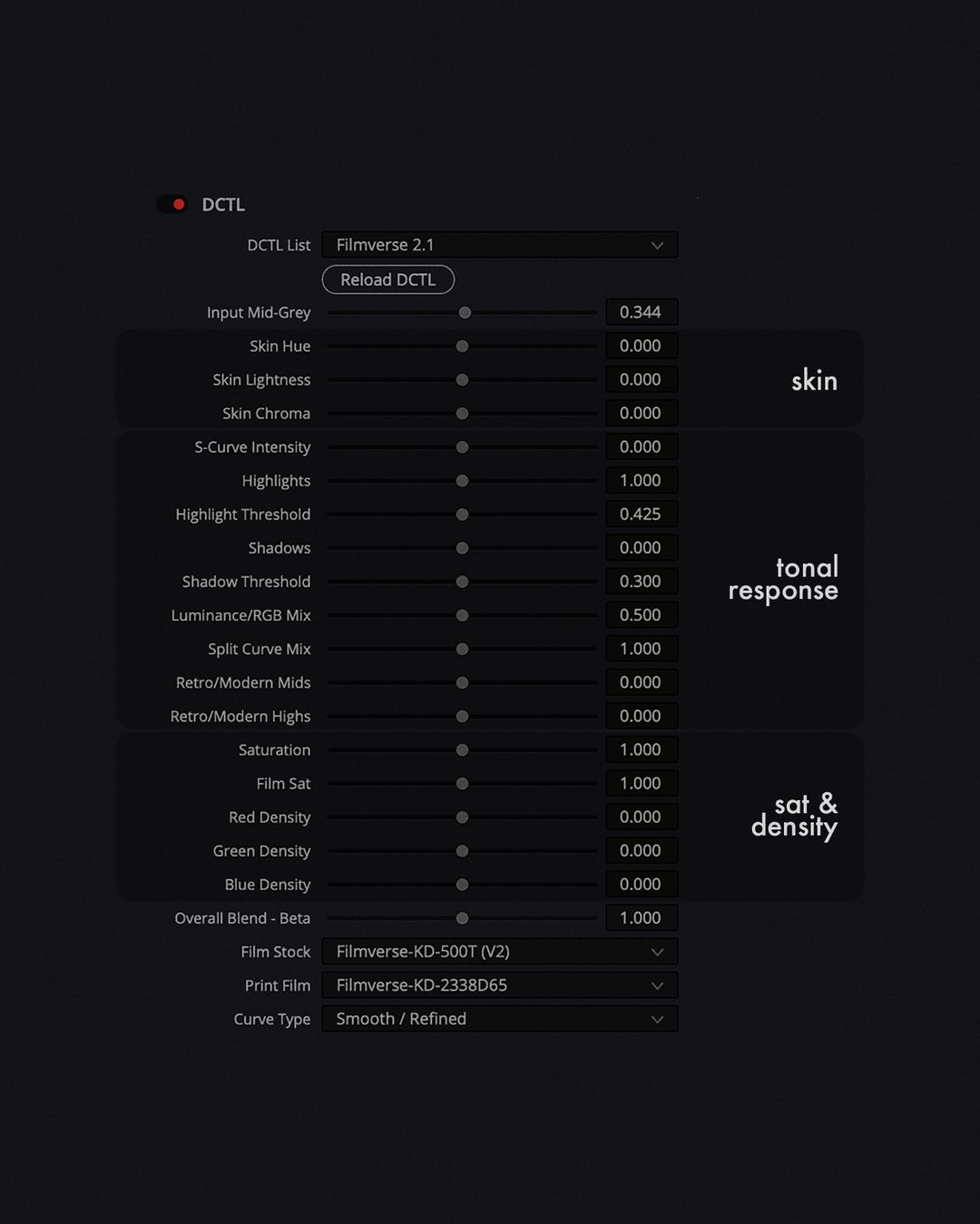
Foreword & introduction Foreword: As early as I remember - I always wondered why films from the west always look "better". From my early assessment as a 13-year-old there seemed to be a vast difference with the way color in films evolved/was evolving in the west as compared to where I was born - South Asia. Much later in life social media lent me a term, and I say this quite cautiously - "Color Grading". As someone on the outside - about 10 years back if you googled "Color in films", the results were a bunch of tricks sold by folks pretending to understand color. I imbibed it and for a very brief period told myself that I know a thing or two about digital color. It was easy to be a one-eyed king among the blind. My newly honed understanding of color earned me the privilege of time, but delusions can only get you so far. It didn't feel right - my traditional approach to color began to break - obviously. Fortunately, at this point enough right resources were already pollinated by someone somewhere for me to evolve. And from there I took about two years to grasp and gain a remote understanding of where the debate on digital color is headed. Currently I am at a position where I have some objective sense of what colorists and the creative communities value (and I am grateful to be here!), and I have chosen the philosophy I want to explore for now. Colorist Foundry and Filmverse Project are my attempts to engage-in and give back to this community from which I am yet to learn a lot more. Here I aim at providing a good number of real resources for free. But some resources must be created with the aim of sustaining the channel, community and me. And while it comes as a standard piece of software - attached is my word that it'll keep evolving as my understanding of digital color expands. Introduction: Currently, Filmverse project aims to be a robust scene-referred film-emulation cum look development plugin designed to achieve a good match to popular film stocks, for both creative and technical purposes and hence providing serious utility to both Colorists and Creatives. It’s available as a DCTL plugin for use within DaVinci Resolve Studio. The plugin is written by Jaideep Panjwani (aka Jai), a color, film, and code nerd based out of Bombay, India. It should be noted when I say a "Good" match I mean to indicate an earnest attempt to cut through a lot of non-accurate film profiling practices and having a precise understanding of where the scratch line begins. How that data is treated - averaged - fitted - rendered onto different images is a whole another debate. Nonetheless, I am excited to share more about my profiling and rendering methods in my upcoming blog series. What are we emulating? Filmverse KD500T: Kodak’s Vision3 series is an excellent starting point for my film emulation journey. I say this with no official association with Kodak, I picked the 500T. Scans were prepared for Davinci Wide Gamut & Davinci Intermediate. Currently the emulation mimics Input vs Output RGB densities in the form of RGB curves. Achieving non-linearity across other dimensions such as sat, and hue maps is rather* simple. The only remotely clever part is choosing the right curve math (linear, poly or spline) and shape to make sure colors maintain a smooth transition. Additionally, I wrote a modified spherical-cum-circular model that is careful near the achromatic axis in regard to chroma noise (more about it in my blogs). The result is process that mimics the non-linearity of 500T film across Saturation, Hue and Tone Curves. Filmverse KD500T emulation that expects Davinci Wide Gamut as input and outputs a cineon log-like output in a Davinci Wide Gamut space. * I say simple assuming we have prepped the negatives factoring in how slight changes by means of light, lens and lab scanning processes can lead to wider changes later on in the emulation process. Filmverse KD2383D65 & Filmverse FF3513D65 - There are two Print film stocks I have targeted to begin with, one Inspired by Kodak Vision Color 2383 Print Film, and another one inspired by Fujifilm 3513 LUT. Again, I say this without any official association with neither Kodak, nor Fujifilm. I have approached Print film emulations with a broader stroke approach as compared to Negative Emulations. The motivation behind doing so was to be able to layer Negative and Print Film together mathematically as separate functions that come together and create the final look - all of this in a scene referred color space. Both Filmverse KD2383D65 & Filmverse FF3513D65 successfully capture the tone curve trend with high accuracy. However, when it comes to modeling saturation & hue - in both print film emulations I tried capturing an average trend rather than going for a 1:1 match. This keeps things simpler while layering it with negative emulation. Despite this, the overall emulation looks pretty comparable to most print film LUTs that I have used - this includes the ones that are available online & the one included within Davinci Resolve itself. This makes for a solid use case if you want to emulate Print Film within a wider color space itself. In future version of Filmverse, I am planning a method to toggle between rendering overall emulation, negative emulation only, or print film emulation only. Film Stocks I plan on adding in near future include Vision 250D, Vision50D, Vision Premier 2393. Vision 2983. Controls I wanted the control set of Filmverse to feel intuitive. But intuition can mean different things to different groups of people, its especially contrasting when you consider people who are at the beginning vs who are much ahead in their journey as colorists/DPs and creatives. The ideal way would be to define controls that most people (including me) would reach out for as soon as applying a grade on a timeline level. Second step would be writing these controls into the plugin - directly allowing people to stretch, pull and push an analog profile in digital context. This thought process has led to me drafting 3 control groups - skin, tonal adjustments, & saturation. Here's an overview of how each control works: Skin Historically, in film productions, certain skin tones have always required more light than other. While film setup had to be shifted to compensate for various skin-types digital allows us the flexibility to bridge the gap between different skin types. Currently Filmverse can isolate and manipulate skin-zone based on the skin vector without introducing significant chroma noise in darker reds. Users can manipulate signals on skin vector across - Hue, Lightness & Chroma. For future versions of Filmverse, there's a skin compressor that I am working on. It compresses all skin types to a better suited saturation and luminance average for better digital treatment. Tonal Response This group focuses on manipulating the overall tonal response of the film emulation. It includes S-curve intensity adjustments, highlights, shadows, split tone mixing and custom split-styles. These tools are essential for replicating the dynamic range and tonal characteristics that are unique to the specifically chosen film stocks. The s-curve is a fundamental part of film emulation, defining how contrast is applied across the tonal range. The highlight control enables fine-tuning of extreme whites, while the highlight threshold determines the starting point for these adjustments. Similarly, the shadow and shadow threshold controls let users define the black point and shadow regions, offering control over how deep or lifted the black point appears. Split-tone feature is crucial for adjusting the split-tone response, blending color-only emulation with traditional filmic tone responses. It gives users the flexibility to control the degree of film-like character in their image. Retro/Modern controls provide an intuitive way to create different stylistic looks by adjusting the overall tonal palette, in both highlights and midtones of the image. Saturation & Density Saturation and density adjustments are key to emulating the color richness and depth characteristic of film. The saturation slider in Filmverse 2.1 increases color saturation in a way that aligns with the film's original saturation curve. Film sat uses proprietary techniques to emulate the nuanced saturation behaviors seen in film. Filmverse 2.1 has separate density sliders for each color channel (red, green, and blue), as opposed to the single density slider in earlier versions. Density controls have been worked rigorously over the past year, making sure that adding density doesn’t break the image. Wide-to-wide color space Davinci Resolve Studio is an excellent editing and color host software. Compared to most platforms, Davinci has a wider appeal when it comes to color. Naturally it makes sense to target Resolve for the initial phases of this project. This is where Davinci Wide Gamut comes in. Currently, I have designed everything to work withing DWG. This allows for the flexibility of accepting footage from any source and exporting for various output options. The only current limitation with film verse being designed for DWG is that it is reliant on Davinci's Tone mapping functions. In the next version I aim to solve this by writing my own DRT and going a step ahead with the picture formation options within Resolve. Currently Filmverse also works well with other DRTs out there. How to install? To install a DCTL in DaVinci Resolve, paste the .dctl file into the LUT folder. Once installed, restart Resolve and access the DCTL via the DCTL OFX effect in the Effects panel on the Color page. What do you get? Filmverse_Lite.dctle Display Rendering Transform (DRT) Non-linear DRT for enhanced tonal rendering Handles values left untreated in modern DRT pipelines Modified base look from FilmVerse Pro Grain & Texture Controls Adjustable grain intensity, radius, contrast, and saturation Film dust simulation with opacity and amount controls Selectable film grain presets: 35mm Film, 16mm Film, 16mm Coarse Film Halation & Softness Adjustments Customizable halation color and size Picture softness control for filmic rendering Input & Output Compatibility Supports multiple input gamuts (ACES, ARRI, Blackmagic, Canon, RED, Sony) Compatible with various log gammas (ACES-CCT, LogC, Canon Log3, RED Log3G10, S-Log3) Output limited to Rec.709 (Gamma 2.2 & Gamma 2.4) Workflow Flexibility "Only DRT" mode for display transform without added film emulation "Only Color" mode to isolate the color science. 







126,000 Royalty-Free 3D Model

Udemy Türkçe


Top Rated News
- CreativeLive Tutorial Collections
- Fasttracktutorials Course
- Chaos Cosmos Library
- MRMockup - Mockup Bundle
- Finding North Photography
- Sean Archer
- John Gress Photography
- Motion Science
- AwTeaches
- Learn Squared
- PhotoWhoa
- Houdini-Course
- Photigy
- August Dering Photography
- StudioGuti
- Creatoom
- Creature Art Teacher
- Creator Foundry
- Patreon Collections
- Udemy - Turkce
- BigFilms
- Jerry Ghionis
- ACIDBITE
- BigMediumSmall
- Globe Plants
- Unleashed Education
- The School of Photography
- Visual Education
- LeartesStudios - Cosmos
- Fxphd
- All Veer Fancy Collection!
- All OJO Images
- All ZZVe Vectors
- CGTrader 1 CGTrader 2



















