

Categories: PhotoShop » Web Design Elements
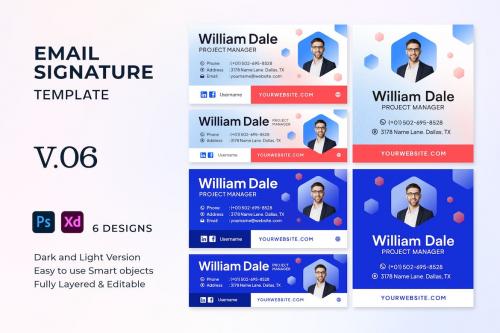
Email Signature Template. V.06
**Email Signature Template. V.06**
This Email Signature Template can help your emails look professional and attractive. Easy to use for your email, simply set it up and drag it to the signature panel.
Features :
* 2 Styles (Light and Dark).
* 6 Design templates.
* Portrait and landscape design.
* Fully layered & well organized
* Free Fonts used
* Editable Text, Colors, & Photo
* PSD and XD Files
CHANGE IMAGE:
1. Go to the "Image" layer group and look for the "Replace Image" smart object layer.
2. Double-click on the "Replace Image" smart object layer to open the smart object window.
3. Insert or paste your image, save, and close the smart object window.
NOTE: PHOTO IN PREVIEW IMAGE ARE NOT INCLUDED


Information
Members of Guests cannot leave comments.
126,000 Royalty-Free 3D Model

Udemy Türkçe


Top Rated News
- CreativeLive Tutorial Collections
- Fasttracktutorials Course
- Chaos Cosmos Library
- MRMockup - Mockup Bundle
- Finding North Photography
- Sean Archer
- John Gress Photography
- Motion Science
- AwTeaches
- Learn Squared
- PhotoWhoa
- Houdini-Course
- Photigy
- August Dering Photography
- StudioGuti
- Creatoom
- Creature Art Teacher
- Creator Foundry
- Patreon Collections
- Udemy - Turkce
- BigFilms
- Jerry Ghionis
- ACIDBITE
- BigMediumSmall
- Globe Plants
- Unleashed Education
- The School of Photography
- Visual Education
- LeartesStudios - Cosmos
- Fxphd
- All Veer Fancy Collection!
- All OJO Images
- All ZZVe Vectors
- CGTrader 1 CGTrader 2



















