

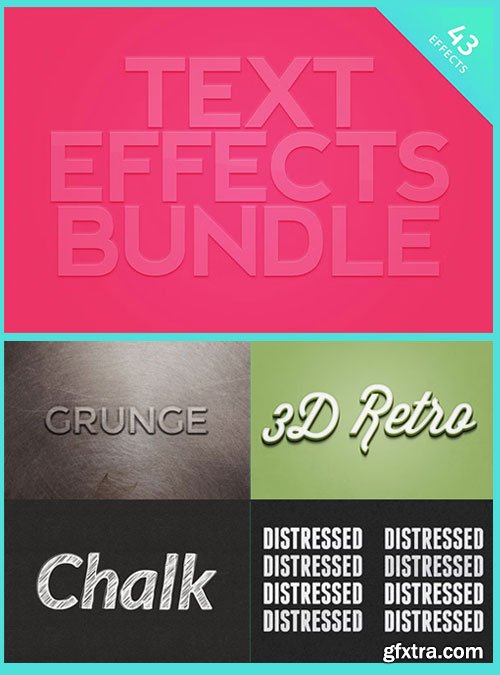
6 Text Effect Bundle | PSD and ATN Files | 55 MB RAR
This bundle includes 6 of our popular and highly rated Text Effect kits for Photoshop.
Easily add great, customizable effects to your text and vector shapes with
just a few clicks using Smart Objects in Photoshop.
This bundle includes 6 of our popular and highly rated Text Effect kits for Photoshop. Easily add great, customizable effects to your text and vector shapes with just a few clicks using Smart Objects in Photoshop. Instantly create impressive 3D retro typography with these 4 editable .psd files. All you need to do is edit the text in the Smart Objects and save. You can also edit the background color and toggle visibility of individual layers to adjust the effects. Use any font and color combination for endless possibilities. This Photoshop mockup allows you to instantly create impressive, hand drawn chalk text effects. Included are four different styles: solid, outlined, scribbled and 3D. Font used in the preview image is Lato Bold Italic. This item is a premium resource with a commercial license. 16 light and dark subtle grunge distressed layer style presets for Photoshop. Ideally suited to text and icons, they can be applied with a single to click to any layer. The effects are supplied as Style Presets (.ASL) for Photoshop. The download includes Dark and Light Styles ASL's and an example PSD. Five grunge textures included: dark concrete, scratched woods, distressed leather, and brushed metal. Use this kit with your own textures, too. Instantly create impressive, plastic-like text effects. Included are four different effects using debossed, embossed, and two with long shadows. Just edit the text in the Smart Objects and save. Edit the background and text colors independently to personalize the effects. Font used in the preview image is Nevis Bold. This pack includes 10 unique retro 3D text effect actions for Photoshop. You can use these on any text layer, and you can choose the font and colors to personalize the effect to suit your needs. Start with a new canvas and write something using your desired font color for the text; then run any of the actions, making sure to have the text layer selected. On both versions (colored and B&W) remember to write your text in the desired font color you want before running the action. Then, for the colored versions, the action will ask you to choose a color for the 3D effect. Adobe Photoshop version CS6 or higher is recommended for the full effects. 3D Retro Text Effects
Chalk Text Effects
Distressed Layer Styles
Grunge Text Effects
Plastic Text Effects
Retro Text Effect Actions



126,000 Royalty-Free 3D Model

Udemy Türkçe


Top Rated News
- CreativeLive Tutorial Collections
- Fasttracktutorials Course
- Chaos Cosmos Library
- MRMockup - Mockup Bundle
- Finding North Photography
- Sean Archer
- John Gress Photography
- Motion Science
- AwTeaches
- Learn Squared
- PhotoWhoa
- Houdini-Course
- Photigy
- August Dering Photography
- StudioGuti
- Creatoom
- Creature Art Teacher
- Creator Foundry
- Patreon Collections
- Udemy - Turkce
- BigFilms
- Jerry Ghionis
- ACIDBITE
- BigMediumSmall
- Globe Plants
- Unleashed Education
- The School of Photography
- Visual Education
- LeartesStudios - Cosmos
- Fxphd
- All Veer Fancy Collection!
- All OJO Images
- All ZZVe Vectors
- CGTrader 1 CGTrader 2



















