

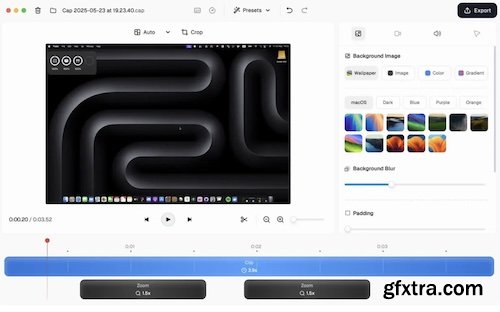
Cap is an open-source screen recorder for macOS and Windows. It records screen, camera, and screenshots, supports instant share links or local Studio recordings, and includes editing tools for backgrounds, padding, rounded corners, shadows, cursor effects, annotations, and exports to MP4 or GIF. It can also generate titles, transcripts, summaries, and chapters.
One app, every workflow
Whether you need speed, studio quality, or a quick screenshot — Cap has a mode for it.
Share your screen or webcam instantly
Hit record, stop, and share. Your video is live with an AI-generated title, summary, chapters, and transcript — all created automatically.
Record in full quality, edit before you share
Studio mode records at the highest quality directly to your device — no compression, no upload. Then customize backgrounds, padding, corners, and more before sharing.
Capture, beautify, share
Take a screenshot with a hotkey, then instantly enhance it with backgrounds, padding, annotations, and more — ready to share in seconds.
Built To Be Yours
Every feature respects how you actually work — your storage, your platform, your workflow. No vendor lock-in, no compromises.
System Requirements:
• macOS 13.1 or later
• Apple Silicon or Intel Core processor
Home Page - https://cap.so/


NeoSkola Bütün Kursları

Udemy Türkçe


Top Rated News
- TheBoudoirDivas All Tutorial
- 126,000 Royalty-Free 3D Models
- CreativeLive Tutorial Collections
- Fasttracktutorials Course
- Chaos Cosmos Library
- MRMockup - Mockup Bundle
- Finding North Photography
- Sean Archer
- John Gress Photography
- Motion Science
- AwTeaches
- Learn Squared
- PhotoWhoa
- Houdini-Course
- Photigy
- August Dering Photography
- StudioGuti
- Creatoom
- Creature Art Teacher
- Creator Foundry
- Patreon Collections
- Udemy - Turkce
- BigFilms
- Jerry Ghionis
- ACIDBITE
- BigMediumSmall
- Globe Plants
- Unleashed Education
- The School of Photography
- Visual Education
- LeartesStudios - Cosmos
- Fxphd
- All Veer Fancy Collection!
- All OJO Images
- All ZZVe Vectors
- CGTrader 1 CGTrader 2



















