

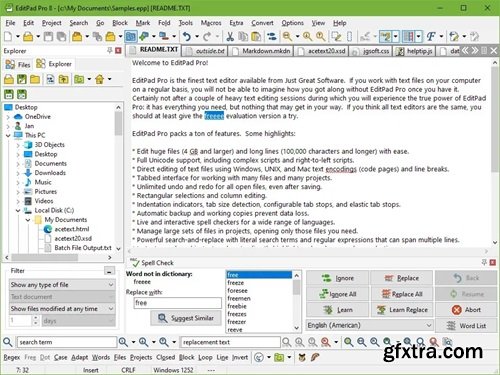
EditPad Pro is a powerful and versatile text editor or word processor. Designed to make text editing as convenient as possible, using EditPad Pro to edit text files will save you a lot of time and frustration.
A Powerful and Convenient Text Editor Operating System: Windows XP, Vista, 7, 8, 8.1, 10, and 11
EditPad Pro has a lot of functionality that makes editing text files more convenient for you. A lot of this does not sound very impressive or even works behind the scenes, but you will surely appreciate it when you need it. These are only a small number of EditPad Pro’s many little features that make heavy text editing a breeze.
With EditPad Pro you can easily open and edit many text files at the same time. There’s no limit. Arrange text files into multiple projects to open them at once and edit them together. Open all files in a folder (and its subfolders) into a project. Many of EditPad Pro’s editing commands can work on all files in a given project at once. Quickly switch between files and projects by clicking on their tabs. Move back and forth with the handy “previous editing position” and “previously edited file” commands. Manage long lists of text files and large projects with the handy file manager sidebar which can rename, move, copy and delete files.
You can make sure you’re writing with proper spelling by using EditPad Pro’s spell checker. Word lists are available in many languages. You can tell EditPad Pro to point out misspelled words in the current file, current project, all open files, or just the selected text. Turn on Live Spelling to make EditPad Pro highlight misspelled words as you type.
EditPad Pro sports one of the most extensive search-and-replace features of any text editor. Quickly find the part of the file you want to edit. Highlight matches, fold lines, and skip over matches and files. Instantly make many replacements throughout a (rectangular) selection, file, project, or all files in all projects. Use regular expressions and adaptive case options for powerful and dynamic search terms and replacements. Clever use of EditPad Pro’s search-and-replace can automate much tedious editing.
Record and play back keystroke macros to reduce repetitive tasks to a single key combination. Record a search as part of a macro to instantly edit all search matches in any particular way. Save any number of macros to build your own library of high-octane text editing wizards.
EditPad Pro’s syntax highlighting is fully configurable. You can change the colors to mimic the CodeGear or Visual Studio IDE, or choose your own colors. EditPad Pro ships with large number of syntax coloring schemes, all of which are fully editable.
Home Page - https://www.editpadpro.com/


126,000 Royalty-Free 3D Model

Udemy Türkçe


Top Rated News
- CreativeLive Tutorial Collections
- Fasttracktutorials Course
- Chaos Cosmos Library
- MRMockup - Mockup Bundle
- Finding North Photography
- Sean Archer
- John Gress Photography
- Motion Science
- AwTeaches
- Learn Squared
- PhotoWhoa
- Houdini-Course
- Photigy
- August Dering Photography
- StudioGuti
- Creatoom
- Creature Art Teacher
- Creator Foundry
- Patreon Collections
- Udemy - Turkce
- BigFilms
- Jerry Ghionis
- ACIDBITE
- BigMediumSmall
- Globe Plants
- Unleashed Education
- The School of Photography
- Visual Education
- LeartesStudios - Cosmos
- Fxphd
- All Veer Fancy Collection!
- All OJO Images
- All ZZVe Vectors
- CGTrader 1 CGTrader 2



















