

Categories: Illustrator » Swatches
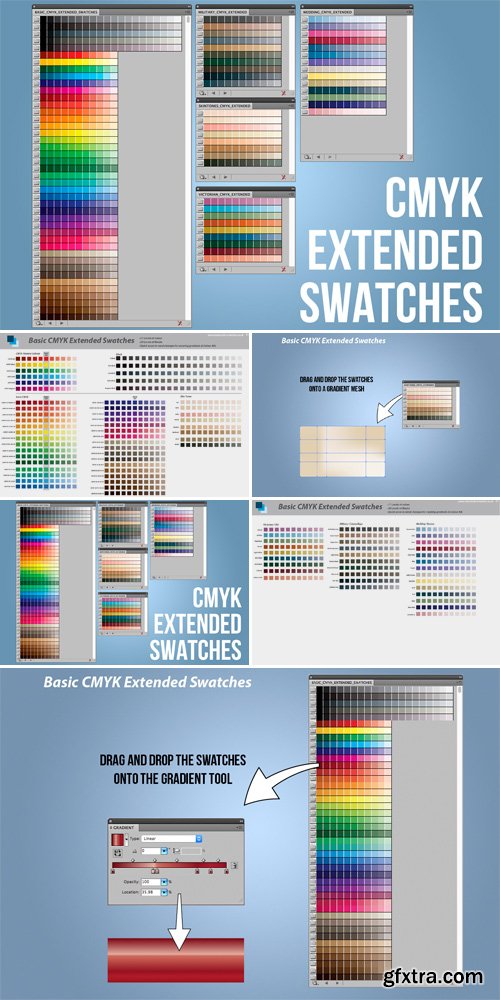
CM - CMYK Extended Swatches 593839
Basic CMYK | Skintones | Victorian
Military Paintwork | Wedding Themes | SALE PAGE
- There are some useful swatches which come with Illustrator. I have used some of these swatches as a starting point to create tonal ranges of each swatch. With these swatches it is easy and quick to create Gradients, fill shapes and colour Gradient Meshes, using different tones of the same colour.
- Some of time saving examples; Example 1: Building a Gradient for a shiny painted surface. Simply drag the colour swatches out onto the gradient editor to create the stops. With a pre made range of tones in the swatches this is both very quick and intuitive to do. Example 2: Shading a vector drawing of a face with all the colour bands made. Simply drag the swatches onto the corresponding areas using a range of skin tones. This way its easy to swap and change colour fills, like painting by numbers!
- To install simply download the ZIP file and put the .ase files in your Adobe Illustrator swatches folder. Alternatively you can save elsewhere and simply point the files when you load via the swatches palette. To use in illustrator go to Window Swatches and select. Works on both Mac and PC.

126,000 Royalty-Free 3D Model

Udemy Türkçe


Top Rated News
- CreativeLive Tutorial Collections
- Fasttracktutorials Course
- Chaos Cosmos Library
- MRMockup - Mockup Bundle
- Finding North Photography
- Sean Archer
- John Gress Photography
- Motion Science
- AwTeaches
- Learn Squared
- PhotoWhoa
- Houdini-Course
- Photigy
- August Dering Photography
- StudioGuti
- Creatoom
- Creature Art Teacher
- Creator Foundry
- Patreon Collections
- Udemy - Turkce
- BigFilms
- Jerry Ghionis
- ACIDBITE
- BigMediumSmall
- Globe Plants
- Unleashed Education
- The School of Photography
- Visual Education
- LeartesStudios - Cosmos
- Fxphd
- All Veer Fancy Collection!
- All OJO Images
- All ZZVe Vectors
- CGTrader 1 CGTrader 2



















