

Anchor Visualizer - Bezier Structure Plugin for Illustrator | 1 MB
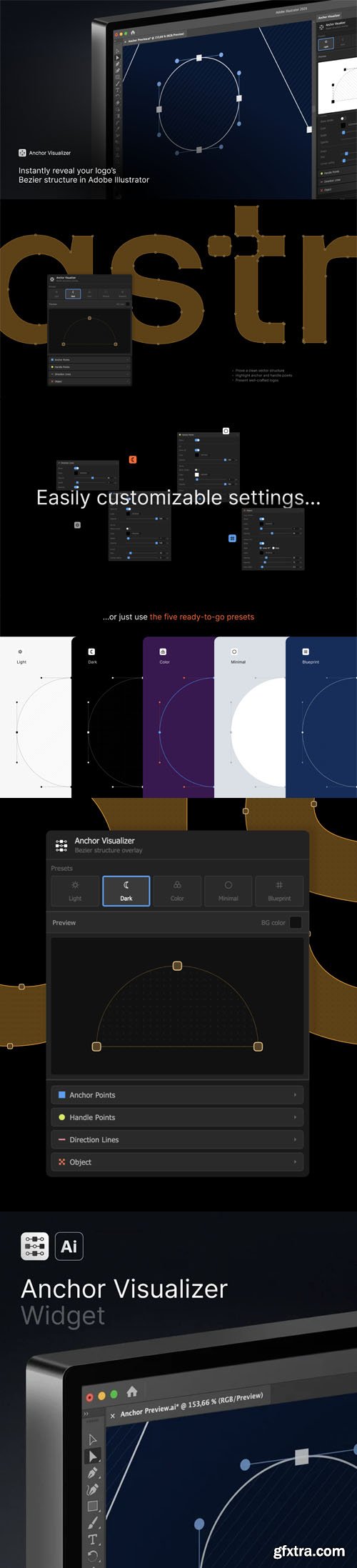
Anchor Visualizer adds a visualization layer on top of your vector objects - showing anchor points, handle points, and direction lines in a fully customizable style.Select any path or compound path, adjust the settings, hit Generate. The plugin creates a separate layer you can style, screenshot, or use in presentations - without touching your original artwork.
Works with simple paths, compound paths, and complex logos.
What you can customize:
- Anchor point fill, stroke, size, and corner radius
- Handle point colors and size
- Direction lines - solid or dashed
- Object stroke overlay
- Pattern fill - diagonal lines or dots
- 5 built-in presets: Light, Dark, Color, Minimal, Blueprint
Great for:
- Portfolio presentations showing your bezier work
- Design process breakdowns and case studies
- Tutorials and educational content
- Quality control - spotting unnecessary anchor points
Requires Adobe Illustrator CC 2019 or newer. macOS and Windows supported.


Related Posts
Information
Members of Guests cannot leave comments.
NeoSkola Bütün Kursları

Udemy Türkçe


Top Rated News
- TheBoudoirDivas All Tutorial
- 126,000 Royalty-Free 3D Models
- CreativeLive Tutorial Collections
- Fasttracktutorials Course
- Chaos Cosmos Library
- MRMockup - Mockup Bundle
- Finding North Photography
- Sean Archer
- John Gress Photography
- Motion Science
- AwTeaches
- Learn Squared
- PhotoWhoa
- Houdini-Course
- Photigy
- August Dering Photography
- StudioGuti
- Creatoom
- Creature Art Teacher
- Creator Foundry
- Patreon Collections
- Udemy - Turkce
- BigFilms
- Jerry Ghionis
- ACIDBITE
- BigMediumSmall
- Globe Plants
- Unleashed Education
- The School of Photography
- Visual Education
- LeartesStudios - Cosmos
- Fxphd
- All Veer Fancy Collection!
- All OJO Images
- All ZZVe Vectors
- CGTrader 1 CGTrader 2



















